rom manager pro on 9Apps

Free download latest rom manager pro for Android here and enjoy it with your phone. Below you can download a list of top and latest apps related to rom manager pro . 9APPS is a fast, safe app store. With 9APPS, you can save a lot of time on searching and downloading apps.

#1 ROM Manager

ROM Manager
Rating: star 4.1 | Version: 5.5.3.7 | Size: 3.6MB
ROM Manager screenshot 1 ROM Manager screenshot 2 ROM Manager screenshot 3

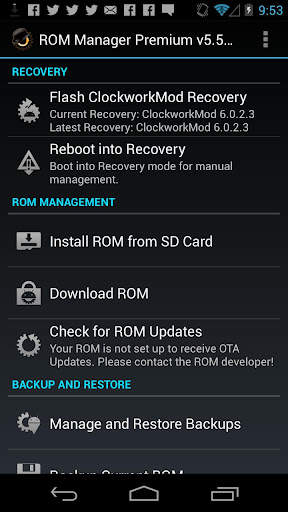
ROM Manager is THE MUST HAVE APP for any Android root user. (Over 10 million downloads and counting!)
* Flash your recovery to the latest and greatest ClockworkMod recovery.
* Manage your ROMs via a handy UI.
* Organize and perform backups and restores from within Android!
* Install ROMs from your SD card.
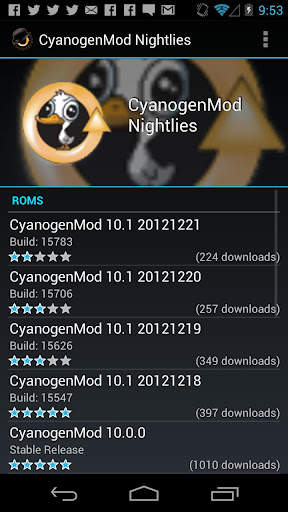
* Install your favorite ROMs over the air!
Premium Version:
* Incremental update zips (save your data plan!)
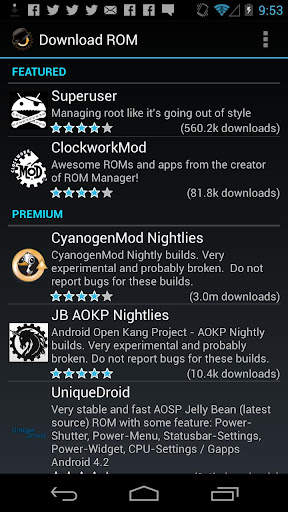
* Premium ROMs
* Receive notifications for when your ROM is updated!
* Automatic backups
* Install Queue
* Web Connect
* Backup Download Server lets you easily transfer backups as flashable zips to your computer.
Do you prefer using only recovery manually? Check out the Touch Recovery in app purchase, for the most advanced recovery available!
Why does ROM Manager ask for account permissions?
Web Connect only needs to access your Google account to connect it to your google account. It can't access any private data or passwords.
ClockworkMod Touch Recovery:
ClockworkMod Touch recovery (and recovery) is work that needs to put in for every new device that is released by a manufacturer.
If work on ROM Manager ceased completely, all the premium features would continue working without issue. However, new recoveries do not port and build themselves. Without ClockworkMod Touch being a per device purchase, there is no way to recoup recurring server costs and labor. Keeping ROM Manager free and operational costs tens of thousands of dollars a year, and that does not include engineering costs.
Your support is appreciated.
Troubleshooting:
Droid users: Stuck at the "M" logo? Flash an alternate recovery and flash back to ClockworkMod.
HTC Users: Flash recovery not working? Try fastbooting a recovery on.
Droid X/2/Pro Users: You must run the Bootstrap application first to use ROM Manager.
Samsung users: You must flash a Clockwork compatible kernel first (see XDA forums)
IF YOU ARE HAVING LICENSE ISSUES, MAKE SURE YOU HAVE THE LATEST VERSION OF FREE (4.0 ) AND THE LATEST LICENSE (1.0.8 ) INSTALLED!

...

👉 For More Detail of ROM Manager

#2 [ROOT] Custom ROM Manager

[ROOT] Custom ROM Manager
Rating: star 4.0 | Version: 6.6.1.10-free-stable-minAPI21 | Size: 6.2MB
[ROOT] Custom ROM Manager screenshot 1 [ROOT] Custom ROM Manager screenshot 2 [ROOT] Custom ROM Manager screenshot 3

Custom ROM Manager was designed to make the process of installing custom ROMs, GApps and other zip files easier, and let users have more control in the process. It will:
🔍 Search zip files present on your device.
📝 Identify the zip files.
🧰 Manage and select zip files for installation.
⚙️ Install selected zip files in TWRP.
⭐ Let you discover popular ROMs.
📊 Show you detailed statistics.
😁 And let you do much more.
🔍 SEARCH ZIP FILES 🔍
It will search for the zip files present on your device. And the search is fast, in fact it is so fast that it only takes less than one-tenth of a second to finish on modern smartphones.
📝 IDENTIFY ZIP FILES 📝
It will also identify the zip files found. It will determine whether a zip file is a ROM, or a GApps package, or some other zip file. If its a ROM or a GApps package, it will also identify some of its properties like its build date, build type, version etc. The properties are then used to easily access, sort and filter the zip files. Additionally it detects whether the zip files can be installed in TWRP or not.
🧰 MANAGE & SELECT ZIP FILES FOR INSTALLATION 🧰
You can manage and select as many zip files as you want for installation. It lets you select the partitions you would want to wipe before installing a zip file. It lets you have full control on the order of installation of zip files.
⚙️ INSTALL SELECTED ZIP FILES IN TWRP ⚙️
After you have finished selecting zip files for installation, it will boot into TWRP and install the zip files in the order you had selected, and will automatically reboot back to system. Only TWRP is supported though.
⭐ DISCOVER POPULAR ROMS ⭐
You can also discover popular ROMs using Custom ROM Manager, and visit official sites of those ROMs. It can also check whether your device is officially supported by a ROM or not. But it will not download any thing for you, you will have to do that yourself. Read more at - https://www.facebook.com/CustomROMManager/posts/538177033274491
📊 DETAILED STATISTICS 📊
You can see detailed statistics of the zip files, like how many zip files of each type are there on your device, how much storage space they are consuming and what not.
OTHER FEATURES
And there are other useful features too...
1. TWRP backup and restore - Provides a way of doing TWRP backup and restore right from the app.
2. In-app search - With in-app search you can easily search for whatever you want within the scope of the app.
3. Folder settings - An entire section dedicated for customizing how and where files are searched in your device.
4. Recent Installs - Tracks the zip files you have installed using the app, keeping privacy in mind.
5. Zip file organiser - Organises installable zip files scattered around your device storage, and puts them in one place so that you can easily find them in recovery.
6. Neat design and great UX - Custom ROM Manager features a neat UI based on material design, and provides a great UX. You will have a great time using the app.
7. Dark theme - Comes with a dark theme option which works in conjunction with the system dark theme.
REQUIREMENTS
1. Root Access is required in order for the app to work properly. Without this, some functions will not work.
2. If you have not installed custom ROMs before using TWRP, then this app is not for you.
3. Only TWRP recovery is supported.
PRO VERSION
A pro version of this app is also present, which does not contain any ads, has extra features, and is highly optimized for performance. You can find it at - https://play.google.com/store/apps/details?id=com.corphish.customrommanager.adfree
IN-APP PURCHASE
An in-app purchase option is also available, which removes ads completely from the app permanently.

...

👉 For More Detail of [ROOT] Custom ROM Manager

#3 [ROOT] Custom ROM Manager (Pro)

[ROOT] Custom ROM Manager (Pro)
Rating: star 4.2 | Version: 6.6.0.7-pro-stable-minAPI21 | Size: 3.4MB
[ROOT] Custom ROM Manager (Pro) screenshot 1 [ROOT] Custom ROM Manager (Pro) screenshot 2 [ROOT] Custom ROM Manager (Pro) screenshot 3

Custom ROM Manager was designed to make the process of installing custom ROMs, GApps and other zip files easier, and let users have more control in the process. It will:
🔍 Search zip files present on your device.
📝 Identify the zip files.
🧰 Manage and select zip files for installation.
⚙️ Install selected zip files in TWRP.
⭐ Let you discover popular ROMs.
📊 Show you detailed statistics.
😁 And let you do much more.
(Check the listing of free version to know more about the features mentioned above, at https://play.google.com/store/apps/details?id=com.corphish.customrommanager.free)
Additionally, the pro version:
🚫 Has no ads.
📂 Lets you have better control on how zip files are searched.
📝 Lets you have better control on how zip files are identified.
📑 Shows useful actions specific to a ROM/GApps.
⚙️ Provides you with more customization options.
🍭 Has adaptive UI.
🎨 Has themes and shapes.
👍 Is faster and much more optimized.
🚫 NO ADS 🚫
Pro version does not contain ads in anyway.
📂 HAVE BETTER CONTROL ON HOW ZIP FILES ARE SEARCHED 📂
Pro version lets users to override the default storage locations (detected by the app) and specify folders in which they usually keep their zip files, which makes searching zip files instantaneous. Additionally, it also lets users to modify the folder names which would be ignored while searching for zip files.
📝 HAVE BETTER CONTROL ON HOW ZIP FILES ARE IDENTIFIED 📝
Custom ROM Manager checks the size of a file to determine whether a zip file is a ROM or a GApps package or some other kind of zip file. In this way the app is able to distinguish between an actual ROM and zip files related to that ROM (like firmware, patches etc). The pro version lets users to have control on this 'size' parameter.
📑 USEFUL ACTIONS SPECIFIC TO A ROM/GAPPS 📑
Pro version shows you useful actions on downloaded files belonging to specific ROM/GApp which you can perform with just one click.
⚙️ MORE CUSTOMIZATION OPTIONS ⚙️
Pro version also lets users have more customization options:
1. Lets users have control on what partitions would be chosen to be wiped when a zip file is "quickly" selected for installation.
2. Enables the "Organise files in subfolder" option in Zip File Organiser section.
🍭 ADAPTIVE UI 🍭
The color of the UI elements changes to match the dominant color of the logo of the ROM/GApp, whose section you are visiting, to give an amazing look and feel of it.
🎨 THEMES 🎨
Pro version lets you choose one from 7 vibrant colors as the theme color. Additionally it also has the 'Random' setting which randomly chooses one from the supported colors during app start up for you. You can also choose the shape of the icons to have a look suited to your style!
👍 FASTER AND MUCH MORE OPTIMIZED 👍
The pro version is optimized and is faster than the free version in general. It is also smaller in size compared to the free version, even though it contains all the features of free version plus it has pro features of its own. Due to this, the memory usage of the app is also minimized.
(Even more details can be found at https://customrommanager.github.io/pro.html)

...

👉 For More Detail of [ROOT] Custom ROM Manager (Pro)

#4 PRO Manager

PRO Manager
Rating: star 5.0 | Version: 1.10 | Size: 6.3MB
PRO Manager screenshot 1 PRO Manager screenshot 2 PRO Manager screenshot 3

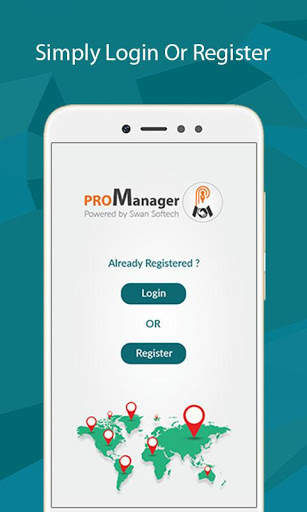
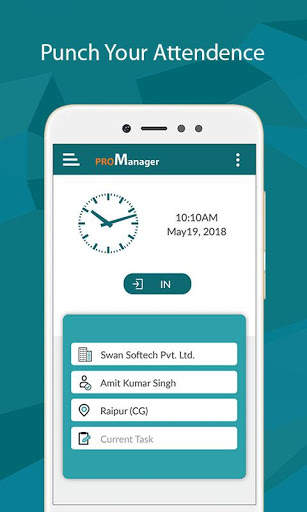
Corporate app for touring staff. Ideal for any size company, small or big to help their staff in capturing tour details easily.
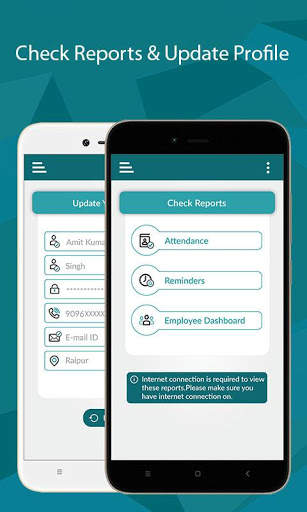
Touring employees can easily mark their attendance on go. Just one click to sign-in or sign-out. Where ever they go, they can easily record the visit details. This app allows to setup follow up reminders with clients and you can see all forth coming follow up reminders in mobile dashboard.
Tour mileage is calculated automatically. Tour reports are generated with simple click, so touring employees can concentrate more on the work, rather than preparing tour reports.
Managers get visibility to “Who is Where and When”?
Managing your Sales Reps / PRO / Medical Representatives on the move was never so easy! With our mobile app you can easily find “Who is Where and When” in Real time.
Our mobile app “ProManager” provides these information in your mobile with a click only. Well, additionally this mobile app provides automatic mileage calculation, attendance recording, reminder reports etc.

...

👉 For More Detail of PRO Manager

#5 ROM Toolbox Pro

ROM Toolbox Pro
Rating: star 3.6 | Version: 6.5.1.0 | Size:
ROM Toolbox Pro screenshot 1 ROM Toolbox Pro screenshot 2 ROM Toolbox Pro screenshot 3

ROM Toolbox is THE MUST HAVE APP for every root user.
ROM Toolbox combines all the great root apps into one monster app with a beautiful and easy to use interface. ROM Toolbox has every tool you need to make your Android device fast and customized to your liking. Save 85% by getting ROM Toolbox instead of spending $30 or more on other apps.
ROM Toolbox has been featured on LifeHacker, XDA-Developers, Droid-Life, Android Central, RootzWiki, Android Police, and other popular sites. We know you will love it; Over 14,000 5 star user reviews! ★★★★★
This app requires root permission. For fast and friendly support please email us at contact@maplemedia.io. We will be glad to help answer your questions or concerns.
ROM Toolbox combines apps like Titanium Backup, ROM Manager, Root Explorer, SetCPU, MetaMorph, Autorun Manager, Terminal Emulator, Script Manager, SD Booster, BuildProp Editor, Font Installer, Boot Animation Installer & many more apps into an all-in-one app! Here is a list of some of the features you will find:
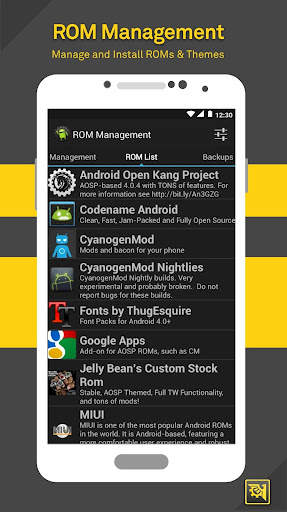
★ ROM Management ★
☆ Install ROMs & themes. AOKP, CyanogenMod and other popular ROMs included.
☆ Create, manage & restore nandroid backups
☆ Wipe data, cache, dalvik-cache, battery stats
☆ Install multiple ROMs & ZIPs from your SD card
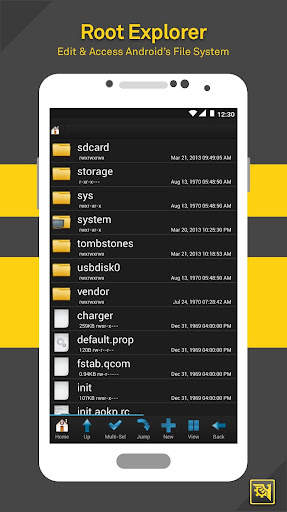
★Root Explorer ★
☆ Access the whole of android's file system (including the elusive data folder!).
☆ Batch copy/paste, zip, tar, delete, view, edit, share, and move any files or folders
☆ Change file permissions and ownership
☆ File manager with two panels for easier management
★ Scripter & Terminal Emulator ★
☆ Create and run scripts as root
☆ Set your scripts to run at-boot
★ Auto Start Manager ★
☆ Enable/disable apps that run on start-up
☆ Enable/disable any broadcast receiver, activity or service
★ Rebooter ★
☆ Reboot recovery, powerdown, bootloader, restart status bar, etc.
★ Font Installer ★
☆ Install custom fonts from a huge list or from your sdcard
☆ Set fonts as favorites & send them to friends
★ Boot Animation Installer ★
☆ Install & preview custom boot animations from a huge collection or from your sdcard
☆ Create a boot animation from a GIF file
☆ Have a new random boot animation each time you boot-up!
★ Theme Manager & Statusbar Icon Changer ★
☆ Create and install full themes (MetaMorph compatible)
☆ Customize your status bar by installing custom icons for WiFi, signal, GPS, etc.
☆ Change your battery icons in the status bar to a custom one from a list of 200+
★ Boot Logo Changer ★
☆ Change your boot logo for supported phones
★ Theme Chooser Themes ★
☆ View a list of themes for the T-Mobile Theme Chooser
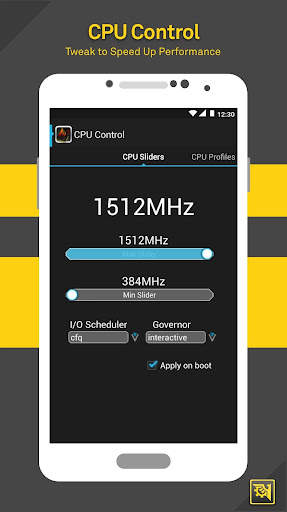
★ Set CPU ★
☆ SetCPU & scaling governor
☆ CPU Profiles
☆ Kernel tweaks to speed up performance
★ Build.prop Editor ★
☆ Easily edit your build.prop
☆ Change lcd density, improve battery life, increase performance
★ Auto Memory Manager ★
☆ Set minfree values & select from presets. Apply values at boot
★ SD Booster ★
☆ Increase the speed of your SD card
Thank you for downloading ROM Toolbox! For questions or feedback, please contact us at contact@maplemedia.io.
Permissions
Contacts - Backup call log and SMS
SMS - Backup call log and SMS
Accounts - Backup and restore from Google Drive

...

👉 For More Detail of ROM Toolbox Pro

Search Results

1/13

You may like

DOWNLOAD IS NOT SUPPORTED IN WEB STORE!
Use the latest version of 9Apps to download APK&OBB file of games in one click!
DOWNLOAD 9APPS