rom manager pro on 9Apps

Free download latest rom manager pro for Android here and enjoy it with your phone. Below you can download a list of top and latest apps related to rom manager pro . 9APPS is a fast, safe app store. With 9APPS, you can save a lot of time on searching and downloading apps.

#1 ROM Manager

ROM Manager
Rating: star 4.1 | Version: 5.5.3.7 | Size: 3.6MB
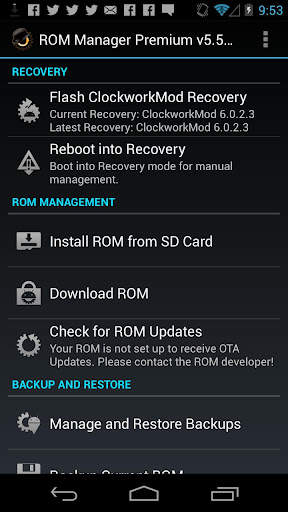
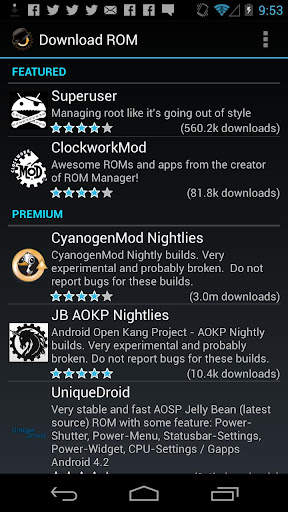
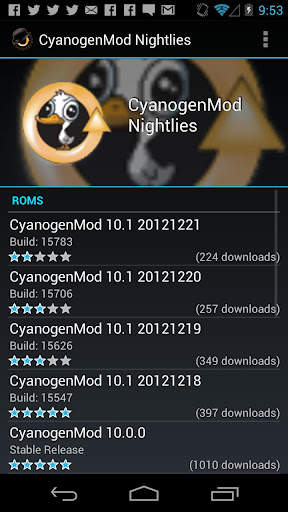
ROM Manager screenshot 1 ROM Manager screenshot 2 ROM Manager screenshot 3

ROM Manager is THE MUST HAVE APP for any Android root user. (Over 10 million downloads and counting!)
* Flash your recovery to the latest and greatest ClockworkMod recovery.
* Manage your ROMs via a handy UI.
* Organize and perform backups and restores from within Android!
* Install ROMs from your SD card.
* Install your favorite ROMs over the air!
Premium Version:
* Incremental update zips (save your data plan!)
* Premium ROMs
* Receive notifications for when your ROM is updated!
* Automatic backups
* Install Queue
* Web Connect
* Backup Download Server lets you easily transfer backups as flashable zips to your computer.
Do you prefer using only recovery manually? Check out the Touch Recovery in app purchase, for the most advanced recovery available!
Why does ROM Manager ask for account permissions?
Web Connect only needs to access your Google account to connect it to your google account. It can't access any private data or passwords.
ClockworkMod Touch Recovery:
ClockworkMod Touch recovery (and recovery) is work that needs to put in for every new device that is released by a manufacturer.
If work on ROM Manager ceased completely, all the premium features would continue working without issue. However, new recoveries do not port and build themselves. Without ClockworkMod Touch being a per device purchase, there is no way to recoup recurring server costs and labor. Keeping ROM Manager free and operational costs tens of thousands of dollars a year, and that does not include engineering costs.
Your support is appreciated.
Troubleshooting:
Droid users: Stuck at the "M" logo? Flash an alternate recovery and flash back to ClockworkMod.
HTC Users: Flash recovery not working? Try fastbooting a recovery on.
Droid X/2/Pro Users: You must run the Bootstrap application first to use ROM Manager.
Samsung users: You must flash a Clockwork compatible kernel first (see XDA forums)
IF YOU ARE HAVING LICENSE ISSUES, MAKE SURE YOU HAVE THE LATEST VERSION OF FREE (4.0 ) AND THE LATEST LICENSE (1.0.8 ) INSTALLED!

...

👉 For More Detail of ROM Manager

#2 [ROOT] Custom ROM Manager

[ROOT] Custom ROM Manager
Rating: star 4.0 | Version: 6.6.1.10-free-stable-minAPI21 | Size: 6.2MB
[ROOT] Custom ROM Manager screenshot 1 [ROOT] Custom ROM Manager screenshot 2 [ROOT] Custom ROM Manager screenshot 3

Custom ROM Manager is ontworpen om het proces van het installeren van aangepaste ROM's, GApps en andere zip-bestanden eenvoudiger te maken en gebruikers meer controle te geven in het proces. Het zal:
🔍 Zip-bestanden zoeken die aanwezig zijn op uw apparaat.
📝 De zip-bestanden identificeren.
🧰 Zip-bestanden beheren en selecteren voor installatie.
⚙️ Geselecteerde zip-bestanden installeren in TWRP .
⭐ Laat je populaire ROM's ontdekken.
📊 Laat je gedetailleerde statistieken zien.
😁 En laat je nog veel meer doen.
🔍 ZOEK ZIP-BESTANDEN 🔍
Het zoekt naar de zip-bestanden die op uw apparaat aanwezig zijn. En het zoeken is snel, in feite zo snel dat het op moderne smartphones slechts minder dan een tiende van een seconde kost om te voltooien.
📝 ZIP-BESTANDEN IDENTIFICEREN 📝
Het zal ook identificeer de gevonden zip-bestanden. Het zal bepalen of een zip-bestand een ROM is, of een GApps-pakket, of een ander zip-bestand. Als het een ROM- of een GApps-pakket is, zal het ook enkele van zijn eigenschappen identificeren, zoals de builddatum, het build-type, de versie enz. De eigenschappen worden vervolgens gebruikt om de zip-bestanden gemakkelijk te openen, te sorteren en te filteren. Bovendien detecteert het of de zip-bestanden kunnen worden geïnstalleerd in TWRP of niet.
🧰 BEHEER EN SELECTEER ZIP-BESTANDEN VOOR INSTALLATIE 🧰
U kunt zoveel zip-bestanden beheren en selecteren als u wilt voor installatie . Hiermee kunt u de partities selecteren die u wilt wissen voordat u een zip-bestand installeert. Het geeft je volledige controle over de volgorde van installatie van zip-bestanden.
⚙️ INSTALLEER GESELECTEERDE ZIP-BESTANDEN IN TWRP ⚙️
Nadat je klaar bent met het selecteren van zip-bestanden voor installatie, zal het opstarten in TWRP en installeer de zip-bestanden in de volgorde die u had geselecteerd, en zal automatisch opnieuw opstarten naar het systeem. Alleen TWRP wordt echter ondersteund.
⭐ ONTDEK POPULAIRE ROMS ⭐
Je kunt ook populaire ROM's ontdekken met Custom ROM Manager en officiële sites van die ROM's bezoeken. Het kan ook controleren of uw apparaat officieel wordt ondersteund door een ROM of niet. Maar het zal niets voor je downloaden, dat moet je zelf doen. Lees meer op - https://www.facebook.com/CustomROMManager/posts/538177033274491
📊 GEDETAILLEERDE STATISTIEKEN 📊
Je kunt gedetailleerde statistieken van de zip-bestanden bekijken, zoals hoeveel zip-bestanden van elk type staan ​​op uw apparaat, hoeveel opslagruimte ze gebruiken en wat niet.
ANDERE FUNCTIES
En er zijn ook andere handige functies ...
1. TWRP-back-up en herstel - Biedt een manier om TWRP-back-up en herstel rechtstreeks vanuit de app uit te voeren.
2. In-app zoeken - Met in-app zoeken kunt u gemakkelijk zoeken naar wat u maar wilt binnen het bereik van de app.
3. Mapinstellingen - Een volledige sectie gewijd aan het aanpassen van hoe en waar bestanden op uw apparaat worden doorzocht.
4. Recente installaties - Houdt de zip-bestanden bij die u met de app hebt geïnstalleerd, rekening houdend met privacy.
5. Zip-bestandsorganizer - organiseert installeerbare zip-bestanden die verspreid zijn over de opslag van uw apparaat en plaatst ze op één plek, zodat u ze gemakkelijk kunt terugvinden tijdens herstel.
6. Net ontwerp en geweldige UX - Custom ROM Manager heeft een nette gebruikersinterface op basis van materiaalontwerp en biedt een geweldige UX. Je zult een geweldige tijd hebben met het gebruik van de app.
7. Donker thema - Wordt geleverd met een donkere thema-optie die werkt in combinatie met het donkere thema van het systeem.
VEREISTEN
1. Root-toegang is vereist om de app correct te laten werken. Zonder dit zullen sommige functies niet werken.
2. Als je geen aangepaste ROM's hebt geïnstalleerd voordat je TWRP gebruikt, dan is deze app niets voor jou.
3. Alleen TWRP-herstel wordt ondersteund.
PRO-VERSIE
Er is ook een pro-versie van deze app aanwezig, die geen advertenties bevat, extra functies heeft en in hoge mate is geoptimaliseerd voor prestatie. Je kunt het vinden op - https://play.google.com/store/apps/details?id=com.corphish.customrommanager.adfree
IN-APP AANKOOP
Een in- app-aankoopoptie is ook beschikbaar, waardoor advertenties permanent volledig uit de app worden verwijderd.

...

👉 For More Detail of [ROOT] Custom ROM Manager

#3 [ROOT] Custom ROM Manager (Pro)

[ROOT] Custom ROM Manager (Pro)
Rating: star 4.2 | Version: 6.6.0.7-pro-stable-minAPI21 | Size: 3.4MB
[ROOT] Custom ROM Manager (Pro) screenshot 1 [ROOT] Custom ROM Manager (Pro) screenshot 2 [ROOT] Custom ROM Manager (Pro) screenshot 3

Custom ROM Manager was designed to make the process of installing custom ROMs, GApps and other zip files easier, and let users have more control in the process. It will:
🔍 Search zip files present on your device.
📝 Identify the zip files.
🧰 Manage and select zip files for installation.
⚙️ Install selected zip files in TWRP.
⭐ Let you discover popular ROMs.
📊 Show you detailed statistics.
😁 And let you do much more.
(Check the listing of free version to know more about the features mentioned above, at https://play.google.com/store/apps/details?id=com.corphish.customrommanager.free)
Additionally, the pro version:
🚫 Has no ads.
📂 Lets you have better control on how zip files are searched.
📝 Lets you have better control on how zip files are identified.
📑 Shows useful actions specific to a ROM/GApps.
⚙️ Provides you with more customization options.
🍭 Has adaptive UI.
🎨 Has themes and shapes.
👍 Is faster and much more optimized.
🚫 NO ADS 🚫
Pro version does not contain ads in anyway.
📂 HAVE BETTER CONTROL ON HOW ZIP FILES ARE SEARCHED 📂
Pro version lets users to override the default storage locations (detected by the app) and specify folders in which they usually keep their zip files, which makes searching zip files instantaneous. Additionally, it also lets users to modify the folder names which would be ignored while searching for zip files.
📝 HAVE BETTER CONTROL ON HOW ZIP FILES ARE IDENTIFIED 📝
Custom ROM Manager checks the size of a file to determine whether a zip file is a ROM or a GApps package or some other kind of zip file. In this way the app is able to distinguish between an actual ROM and zip files related to that ROM (like firmware, patches etc). The pro version lets users to have control on this 'size' parameter.
📑 USEFUL ACTIONS SPECIFIC TO A ROM/GAPPS 📑
Pro version shows you useful actions on downloaded files belonging to specific ROM/GApp which you can perform with just one click.
⚙️ MORE CUSTOMIZATION OPTIONS ⚙️
Pro version also lets users have more customization options:
1. Lets users have control on what partitions would be chosen to be wiped when a zip file is "quickly" selected for installation.
2. Enables the "Organise files in subfolder" option in Zip File Organiser section.
🍭 ADAPTIVE UI 🍭
The color of the UI elements changes to match the dominant color of the logo of the ROM/GApp, whose section you are visiting, to give an amazing look and feel of it.
🎨 THEMES 🎨
Pro version lets you choose one from 7 vibrant colors as the theme color. Additionally it also has the 'Random' setting which randomly chooses one from the supported colors during app start up for you. You can also choose the shape of the icons to have a look suited to your style!
👍 FASTER AND MUCH MORE OPTIMIZED 👍
The pro version is optimized and is faster than the free version in general. It is also smaller in size compared to the free version, even though it contains all the features of free version plus it has pro features of its own. Due to this, the memory usage of the app is also minimized.
(Even more details can be found at https://customrommanager.github.io/pro.html)

...

👉 For More Detail of [ROOT] Custom ROM Manager (Pro)

#4 PRO Manager

PRO Manager
Rating: star 5.0 | Version: 1.10 | Size: 6.3MB
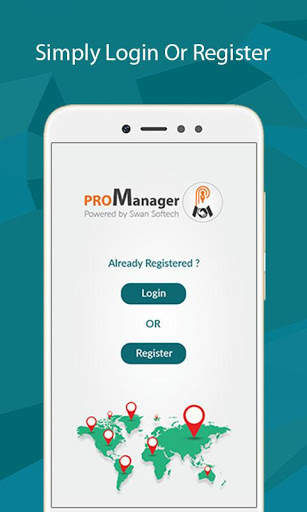
PRO Manager screenshot 1 PRO Manager screenshot 2 PRO Manager screenshot 3

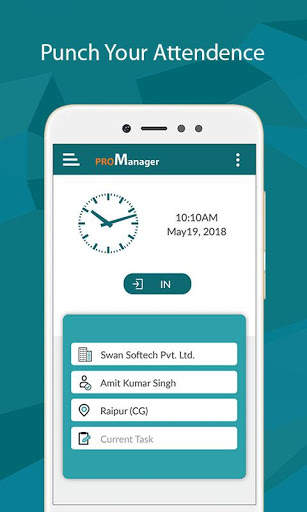
Corporate app for touring staff. Ideal for any size company, small or big to help their staff in capturing tour details easily.
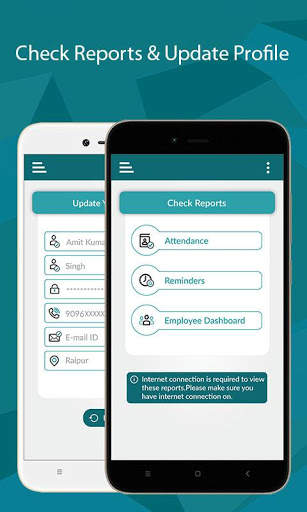
Touring employees can easily mark their attendance on go. Just one click to sign-in or sign-out. Where ever they go, they can easily record the visit details. This app allows to setup follow up reminders with clients and you can see all forth coming follow up reminders in mobile dashboard.
Tour mileage is calculated automatically. Tour reports are generated with simple click, so touring employees can concentrate more on the work, rather than preparing tour reports.
Managers get visibility to “Who is Where and When”?
Managing your Sales Reps / PRO / Medical Representatives on the move was never so easy! With our mobile app you can easily find “Who is Where and When” in Real time.
Our mobile app “ProManager” provides these information in your mobile with a click only. Well, additionally this mobile app provides automatic mileage calculation, attendance recording, reminder reports etc.

...

👉 For More Detail of PRO Manager

#5 ROM Toolbox Pro

ROM Toolbox Pro
Rating: star 3.6 | Version: 6.5.1.0 | Size:
ROM Toolbox Pro screenshot 1 ROM Toolbox Pro screenshot 2 ROM Toolbox Pro screenshot 3

ROM Toolbox is de must-app
voor elke rootgebruiker.
ROM Toolbox Combineert alle grote root-apps in één Monster-app met een prachtige en eenvoudig te gebruiken interface. ROM Toolbox heeft elk hulpmiddel dat u nodig hebt om uw Android-apparaat snel en aangepast naar wens te maken.
Bespaar 85% door ROM-toolbox
te krijgen in plaats van $ 30 of meer uit te geven op andere apps.
ROM Toolbox is te zien op Lifehacker, XDA-ontwikkelaars, Droid-Life, Android Central, Rootzwiki , Android-politie en andere populaire sites. We weten dat je ervan zult houden;
Meer dan 14.000 5-sterren gebruikersbeoordelingen! ★★★★★
Deze app vereist root-toestemming. Voor snelle en vriendelijke ondersteuning kunt u ons een e-mail sturen op Contact@mapleMedia.io. We helpen u graag bij het beantwoorden van uw vragen of opmerkingen.
ROM Toolbox Combines Apps zoals Titanium Backup, Rom Manager, Root Explorer, SetCpu, Metamorph, Autorun Manager, Terminal Emulator, Script Manager, SD Booster, BuildProp Editor , Font Installer, Boot Animation Installer & nog veel meer apps in een all-in-one-app! Hier is een lijst met enkele van de functies die u zult vinden:

ROM MANAGEMENT

☆ Installeer ROMS & Thema's. AOKP, CyanogenMod en andere populaire ROM's inbegrepen.
☆ Maken, beheren en herstellen Nandroid back-ups
☆ Wis gegevens, cache, dalvik-cache, batterij statistieken
☆ Installeer meerdere roms & ritsen

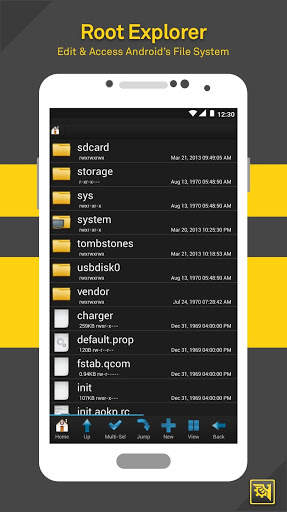
Root Explorer

☆ Toegang tot het hele bestandssysteem van Android (inclusief de ongrijpbare gegevensmap!).
☆ Batch kopie / plakken, ZIP, TAR, DELETE, Bestanden of mappen bekijken, bewerken, delen en verplaatsen
☆ Bestandsrechten en eigendom wijzigen
☆ Bestandsbeheer met twee panelen voor gemakkelijker management

Scripter & Terminal Emulator

☆ Maken en uitvoeren van scripts als root
☆ Stel uw scripts in om bij-Boot te draaien

Auto Start Manager

☆ Apps inschakelen / uitschakelen Die draaien op Start-Up
☆ Schakel elke uitzendontvanger, activiteit of service in / uit, ★
READERTER

☆ Reboot Recovery, Powerdown, Bootloader, Start Status , enz.

Font Installer

☆ Installeer aangepaste lettertypen uit een enorme lijst of van uw SDCard
☆ Set lettertypen als favorieten en verzenden Hen aan vrienden

Boot-animatie-installatieprogramma

☆ Installeren & voorbeeld aangepaste opstartanimaties uit een enorme collectie of van uw SDCard
☆ Maak een opstartanimatie van een GIF Bestand
☆ Heb een nieuwe willekeurige opstartanimatie telkens wanneer u opstart!

Theme Manager & StatusBar Pictogramwisselaar

☆ Maak en installeer volledige thema's (Metamorf Compatibel)
☆ Personaliseer uw statusbalk door aangepaste pictogrammen voor WiFi, signaal, GPS, enz.
☆ Uw batterijpictogrammen in de statusbalk wijzigen in een lijst met een lijst van 200+

Boot-logo-wisselaar

☆ Uw boot-logo wijzigen voor ondersteunde telefoons

Thema chooser thema's

☆ Bekijk een lijst met Thema's voor de T-Mobile Theme Chooser

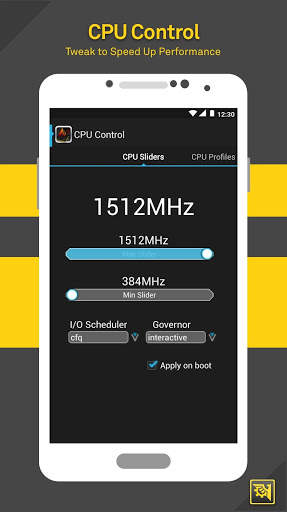
Set CPU

☆ SETCPU & Scaling Gouveror
☆ CPU-profielen
☆ Kernel tweaks om prestaties te versnellen

Build.Prop Editor

☆ eenvoudig uw build.prop bewerken
☆ Wijzig LCD-dichtheid, Verbeter de levensduur van de batterij, de prestaties verhogen

Auto-memor Y-manager

☆ Set MinFree-waarden & kies uit Presets. Pas de waarden toe bij Boot

SD Booster

☆ Verhoog de snelheid van je SD-kaart
Bedankt voor het downloaden van ROM Toolbox! Neem voor vragen of feedback contact met ons op bij Contact@mapleMedia.io.
Machtigingen
Contacten - Back-up Oproeplog en SMS
SMS - Back-up Oproeplog en SMS
ACCOUNTS - Back-up en herstel vanuit Google Drive

...

👉 For More Detail of ROM Toolbox Pro

Search Results

1/13

You may like

DOWNLOAD IS NOT SUPPORTED IN WEB STORE!
Use the latest version of 9Apps to download APK&OBB file of games in one click!
DOWNLOAD 9APPS