rom manager app on 9Apps

Free download latest rom manager app for Android here and enjoy it with your phone. Below you can download a list of top and latest apps related to rom manager app . 9APPS is a fast, safe app store. With 9APPS, you can save a lot of time on searching and downloading apps.

#1 ROM Manager

ROM Manager
Rating: star 4.1 | Version: 5.5.3.7 | Size: 3.6MB
ROM Manager screenshot 1 ROM Manager screenshot 2 ROM Manager screenshot 3

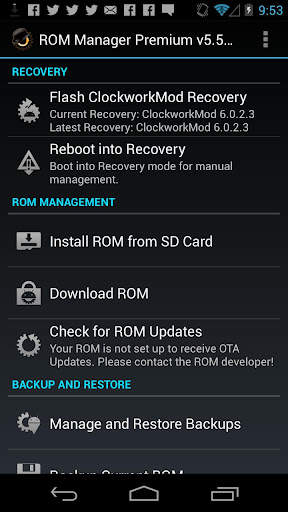
ROM Manager is THE MUST HAVE APP for any Android root user. (Over 10 million downloads and counting!)
* Flash your recovery to the latest and greatest ClockworkMod recovery.
* Manage your ROMs via a handy UI.
* Organize and perform backups and restores from within Android!
* Install ROMs from your SD card.
* Install your favorite ROMs over the air!
Premium Version:
* Incremental update zips (save your data plan!)
* Premium ROMs
* Receive notifications for when your ROM is updated!
* Automatic backups
* Install Queue
* Web Connect
* Backup Download Server lets you easily transfer backups as flashable zips to your computer.
Do you prefer using only recovery manually? Check out the Touch Recovery in app purchase, for the most advanced recovery available!
Why does ROM Manager ask for account permissions?
Web Connect only needs to access your Google account to connect it to your google account. It can't access any private data or passwords.
ClockworkMod Touch Recovery:
ClockworkMod Touch recovery (and recovery) is work that needs to put in for every new device that is released by a manufacturer.
If work on ROM Manager ceased completely, all the premium features would continue working without issue. However, new recoveries do not port and build themselves. Without ClockworkMod Touch being a per device purchase, there is no way to recoup recurring server costs and labor. Keeping ROM Manager free and operational costs tens of thousands of dollars a year, and that does not include engineering costs.
Your support is appreciated.
Troubleshooting:
Droid users: Stuck at the "M" logo? Flash an alternate recovery and flash back to ClockworkMod.
HTC Users: Flash recovery not working? Try fastbooting a recovery on.
Droid X/2/Pro Users: You must run the Bootstrap application first to use ROM Manager.
Samsung users: You must flash a Clockwork compatible kernel first (see XDA forums)
IF YOU ARE HAVING LICENSE ISSUES, MAKE SURE YOU HAVE THE LATEST VERSION OF FREE (4.0 ) AND THE LATEST LICENSE (1.0.8 ) INSTALLED!

...

👉 For More Detail of ROM Manager

#2 [ROOT] Custom ROM Manager

[ROOT] Custom ROM Manager
Rating: star 4.0 | Version: 6.6.1.10-free-stable-minAPI21 | Size: 6.2MB
[ROOT] Custom ROM Manager screenshot 1 [ROOT] Custom ROM Manager screenshot 2 [ROOT] Custom ROM Manager screenshot 3

Custom ROM Manager ได้รับการออกแบบมาเพื่อให้กระบวนการติดตั้ง ROMS, GAPPS และไฟล์ซิปอื่น ๆ ที่กำหนดเองง่ายขึ้นและให้ผู้ใช้สามารถควบคุมได้มากขึ้นในกระบวนการ มันจะ:
🔍ค้นหาไฟล์ zip ที่อยู่บนอุปกรณ์ของคุณ
📝ระบุไฟล์ zip
🧰จัดการและเลือกไฟล์ zip สำหรับการติดตั้ง
⚙️ติดตั้งไฟล์ zip ที่เลือกใน twrp
⭐ให้คุณค้นพบ Roms ยอดนิยม
📊แสดงสถิติโดยละเอียด
😁และให้คุณทำมากขึ้น
🔍ค้นหาไฟล์ zip 🔍
มันจะค้นหารหัสไปรษณีย์ ไฟล์ที่มีอยู่ในอุปกรณ์ของคุณ และการค้นหานั้นรวดเร็วในความเป็นจริงมันเร็วมากจนใช้เวลาน้อยกว่าหนึ่งในสิบของวินาทีที่จะเสร็จสิ้นบนสมาร์ทโฟนที่ทันสมัย ​​
📝ระบุไฟล์ zip 📝
มันจะระบุซิป ไฟล์ที่พบ มันจะเป็นตัวกำหนดว่าไฟล์ zip เป็น ROM หรือแพ็คเกจ GAPPS หรือไฟล์ซิปอื่น ๆ หากเป็นแพคเกจ ROM หรือ GAPPS จะระบุคุณสมบัติบางอย่างเช่นวันที่สร้างประเภทการสร้างรุ่น ฯลฯ คุณสมบัติจะถูกใช้เพื่อเข้าถึงและกรองไฟล์ ZIP ได้อย่างง่ายดาย นอกจากนี้ยังตรวจพบว่าสามารถติดตั้งไฟล์ zip ใน twrp หรือไม่
🧰จัดการและเลือกไฟล์ zip สำหรับการติดตั้ง🧰
คุณสามารถจัดการและเลือกไฟล์ zip ได้มากเท่าที่คุณต้องการสำหรับการติดตั้ง มันช่วยให้คุณเลือกพาร์ติชันที่คุณต้องการล้างก่อนที่จะติดตั้งไฟล์ zip มันช่วยให้คุณสามารถควบคุมลำดับการติดตั้งไฟล์ zip ได้อย่างสมบูรณ์
⚙️ติดตั้งไฟล์ zip ที่เลือกใน twrp ⚙️
หลังจากที่คุณเลือกไฟล์ zip สำหรับการติดตั้งเสร็จแล้วมันจะบูตเป็น twrp และติดตั้ง ไฟล์ zip ตามลำดับที่คุณเลือกและจะรีบูตกลับไปที่ระบบโดยอัตโนมัติ รองรับ TWRP เท่านั้น
⭐ค้นพบ Roms ยอดนิยม⭐
คุณสามารถค้นพบ ROM ยอดนิยมโดยใช้ Custom Rom Manager และเยี่ยมชมเว็บไซต์อย่างเป็นทางการของ ROM เหล่านั้น นอกจากนี้ยังสามารถตรวจสอบว่าอุปกรณ์ของคุณได้รับการสนับสนุนอย่างเป็นทางการโดย ROM หรือไม่ แต่มันจะไม่ดาวน์โหลดสิ่งใดสำหรับคุณคุณจะต้องทำเช่นนั้นด้วยตัวเอง อ่านเพิ่มเติมที่ - https://www.facebook.com/customrommanager/posts/538177033274491
📊สถิติโดยละเอียด📊
คุณสามารถดูสถิติโดยละเอียดของไฟล์ zip เช่นจำนวนไฟล์ซิปของแต่ละประเภท มีอยู่ในอุปกรณ์ของคุณพื้นที่เก็บข้อมูลมากแค่ไหนที่พวกเขาบริโภคและสิ่งที่ไม่เป็นเช่นนั้น
คุณสมบัติอื่น ๆ
และมีคุณสมบัติที่มีประโยชน์อื่น ๆ เช่นกัน ...
1 TWRP Backup and Restore - ให้วิธีการสำรองข้อมูล TWRP และกู้คืนจากแอปฟรี
2. ในแอปค้นหา - ด้วยการค้นหาในแอปคุณสามารถค้นหาสิ่งที่คุณต้องการภายในขอบเขตของแอปได้อย่างง่ายดาย
3. การตั้งค่าโฟลเดอร์ - ส่วนทั้งหมดที่ทุ่มเทให้กับการปรับแต่งวิธีการค้นหาไฟล์ในอุปกรณ์ของคุณ
4. การติดตั้งล่าสุด - ติดตามไฟล์ zip ที่คุณติดตั้งโดยใช้แอปรักษาความเป็นส่วนตัวในใจ
5 Zip File Organizer - จัดเรียงไฟล์ซิปที่ติดตั้งได้กระจัดกระจายไปรอบ ๆ ที่เก็บอุปกรณ์ของคุณและวางไว้ในที่เดียวเพื่อให้คุณสามารถค้นหาได้อย่างง่ายดายในการกู้คืน
6 การออกแบบที่ประณีตและ Great UX - Custom Rom Manager มี UI ที่เรียบร้อยตามการออกแบบวัสดุและให้ UX ที่ยอดเยี่ยม คุณจะมีช่วงเวลาที่ดีในการใช้แอพ
7. ธีมสีเข้ม - มาพร้อมกับตัวเลือกธีมที่มืดซึ่งทำงานร่วมกับธีมสีเข้มของระบบ
จำเป็นต้องมีการเข้าถึงรูทเพื่อให้แอปทำงานอย่างถูกต้อง หากไม่มีสิ่งนี้บางฟังก์ชั่นจะไม่ทำงาน
2. หากคุณยังไม่ได้ติดตั้ง ROM ที่กำหนดเองก่อนใช้ TWRP แอพนี้ไม่เหมาะสำหรับคุณ
3. รองรับการกู้คืน TWRP เท่านั้น |
รุ่น Pro - รุ่น Pro ของแอพนี้ยังมีอยู่ซึ่งไม่มีโฆษณาใด ๆ มีคุณสมบัติพิเศษและได้รับการปรับให้เหมาะสมอย่างมากสำหรับประสิทธิภาพ คุณสามารถค้นหาได้ที่ - https://play.google.com/store/apps/details?id=com.corphish.customrommanager.adfree
การซื้อในแอป
ตัวเลือกการซื้อในแอป นอกจากนี้ยังมีอยู่ซึ่งลบโฆษณาอย่างสมบูรณ์จากแอปอย่างถาวร

...

👉 For More Detail of [ROOT] Custom ROM Manager

#3 Rom Manager Janitor

Rom Manager Janitor
Rating: star 3.0 | Version: 2.9 | Size: 92.3KB
Rom Manager Janitor screenshot 1 Rom Manager Janitor screenshot 2 Rom Manager Janitor screenshot 3

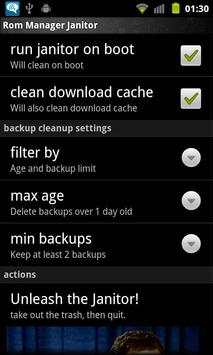
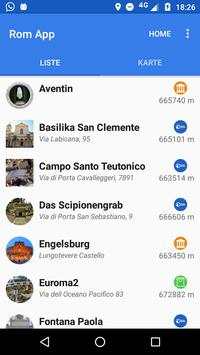
Automatically deletes old backups from rom manager so you don't have to.
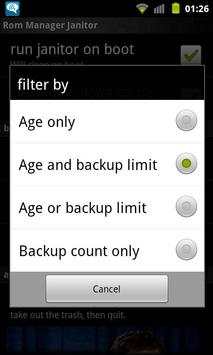
You select how old of backups and/or how many you want to keep and then forgot about it.
Ignores backups with custom names. So anything not like 2011-02-25-14.29.23, 2011-02-25.14.29.23 or ScheduledBackup-2011-02-25-14.29.23 will be left alone during cleaning.
Run once and then forget about it. It'll automatically do cleans on boot from then onwards.
Excellent if you like to install the CyanogenMod nightlies every day or for those who like to run scheduled backups.
Want more options/features? Send me an email about what you want.
Requires:
•Root (Android 4.2 only)
•ClockWorkMod or TWRP (To make the backups. ROM Manager Janitor doesn't actually use it)
•ROM Manager (Since this is a cleanup tool for ROM Manager ;)

...

👉 For More Detail of Rom Manager Janitor

#4 Rom App

Rom App
Rating: star 3.0 | Version: 1.0.1 | Size: 31.6MB
Rom App screenshot 1 Rom App screenshot 2 Rom App screenshot 3

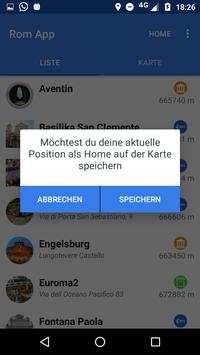
Mit dieser App ist das Erkunden von Rom ein
Klacks
:)
Spannende Geheimtipps und interessante Sehenswürdigkeiten warten auf dich.
Visualisiere deine Ziele auf zwei Arten:
◆ Die Karte bietet eine idealen Überblick über deine Ziele.
◆ In der Listenansicht kannst du optimal filtern, sortieren und durch Kategorien selektieren
Damit du dich nicht verirrst, kannst du deine Home-Position speichern und auf der Karte anzeigen lassen.
Und das Beste, alles funktioniert offline (außer das Herunterladen der App)

...

👉 For More Detail of Rom App

#5 App Manager

App Manager
Rating: star 3.9 | Version: 2.25.0.44 | Size: 2.5MB
App Manager screenshot 1 App Manager screenshot 2 App Manager screenshot 3

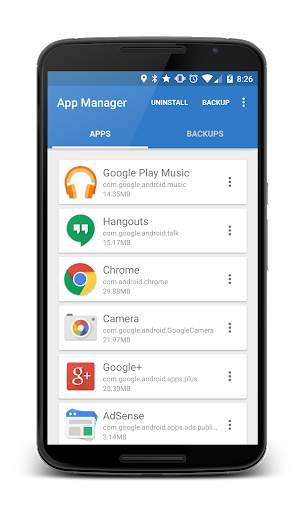
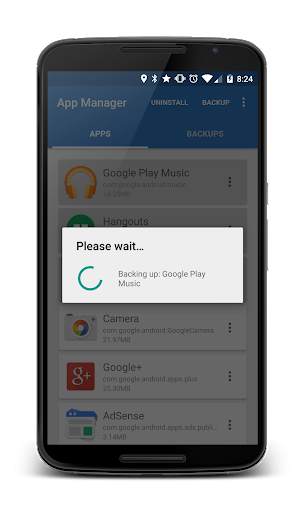
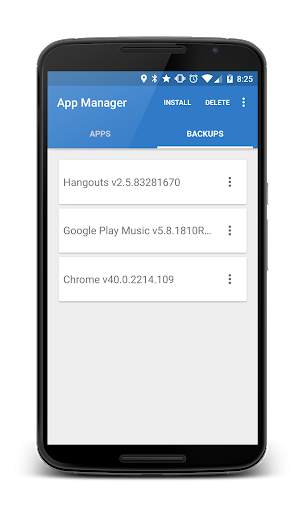
App Manager is a light-weight tool designed to simply help the user to batch uninstall and backup applications with the least amount of permissions as possible. The application quickly lists all the installed applications on the user's device, displaying information about each application allowing the users to choose whether to un-install, backup or read detailed information about each application.
- Backup APKs to SDCard
- Install APKs from SDCard
- Un-install applications
Where are my Apps being backed up to?
On your external SDCard, in "~/Android/data/burrows.apps.appmanager"
Why doesn't App Manager back up app data?
To protect user's data! This application does not "image" your phone.
Why doesn't App Manager back up certain applications?
Usually the application was installed in the "/data/app-private" folder which is protected. Usually system application are stored here.
Contact Jared Burrows:
- Visit the BurrowsApps Website:
https://www.burrowsapps.com/
- Follow me on Twitter:
https://twitter.com/jaredsburrows
- Email me here:
burrowsapps@gmail.com

...

👉 For More Detail of App Manager

Search Results

1/20

You may like

DOWNLOAD IS NOT SUPPORTED IN WEB STORE!
Use the latest version of 9Apps to download APK&OBB file of games in one click!
DOWNLOAD 9APPS