snapseed apk on 9Apps

Free download latest snapseed apk for Android here and enjoy it with your phone. Below you can download a list of top and latest apps related to snapseed apk . 9APPS is a fast, safe app store. With 9APPS, you can save a lot of time on searching and downloading apps.

#1 Snapseed
Snapseed
Rating: star 4.3 | Version: 2.20.0.526050212 | Size: 26.6MB
Snapseed screenshot 1 Snapseed screenshot 2 Snapseed screenshot 3

Snapseed is a complete and professional photo editor developed by Google.
== KEY FEATURES==
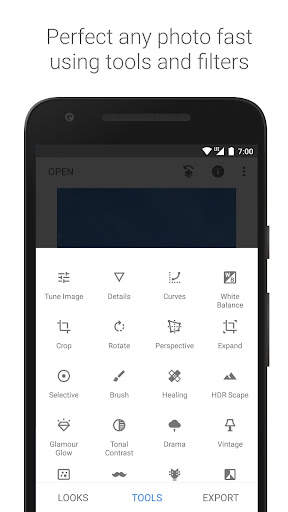
• 29 Tools and Filters, including: Healing, Brush, Structure, HDR, Perspective (see list below)
• Opens JPG and RAW files
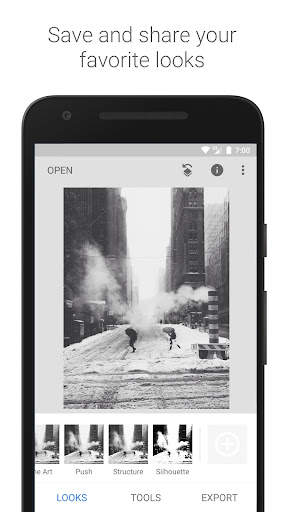
• Save your personal looks and apply them to new photos later
• Selective filter brush
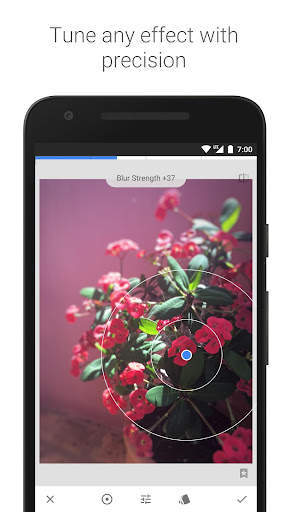
• All styles can be tweaked with fine, precise control
== TOOLS, FILTERS AND FACE ==
• RAW Develop – open and tweak RAW DNG files; save non-destructively or export as JPG
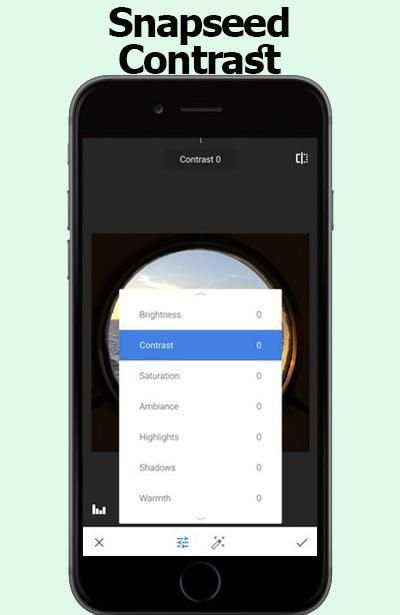
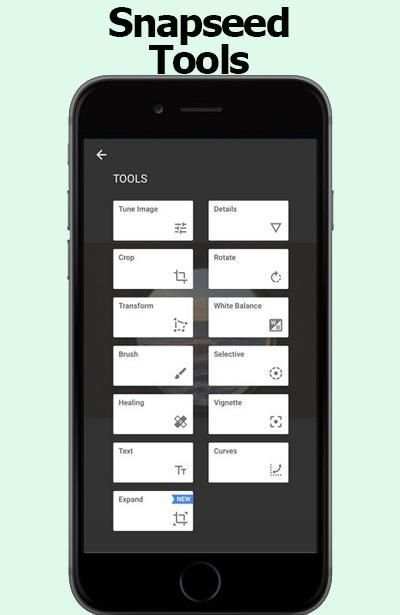
• Tune image – adjust exposure and color automatically or manually with fine, precise control
• Details – magically brings out surface structures in images
• Crop – crop to standard sizes or freely
• Rotate – rotate by 90°, or straighten a skewed horizon
• Perspective – fix skewed lines and perfect the geometry of horizons or buildings
• White Balance – adjust the colors so that the image looks more natural
• Brush – selectively retouch exposure, saturation, brightness or warmth
• Selective – the renown “Control Point” technology: Position up to 8 points on the image and assign enhancements, the algorithm does the rest magically
• Healing – remove the uninvited neighbor from a group picture
• Vignette – add a soft darkness around the corners like a beautiful, wide-aperture would do
• Text – add both stylized or plain text
• Curves - have precise control over the brightness levels in your photos
• Expand - increase the size of your canvas and fill up the new space in smart ways with content of your image
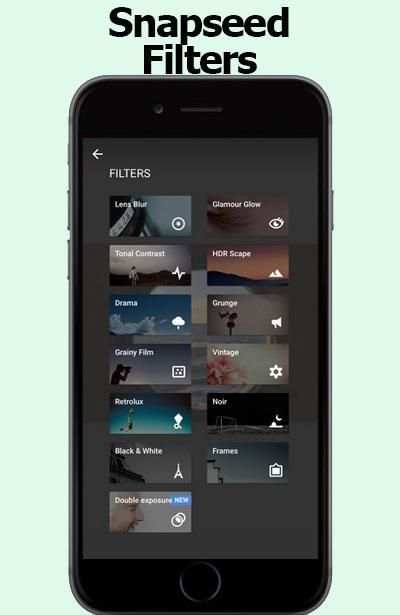
• Lens Blur – add a beautiful Bokeh to images (background softening), ideal for photographic portraits
• Glamour Glow – add a fine glow to images, great for fashion or portraits
• Tonal Contrast – boost details selectively in the shadows, midtones and highlights
• HDR Scape – bring a stunning look to your images by creating the effect of multiple exposures
• Drama – add a hint of doomsday to your images (6 styles)
• Grunge – an edgy look with strong styles and texture overlays
• Grainy Film – get modern film looks with realistic grain
• Vintage – the style of color film photo from the 50’s, 60’s or 70’s
• Retrolux – go retro with light leaks, scratches, film styles
• Noir – Black and White film looks with realistic grain and the “wash” effect
• Black & White – classic Black and White look straight out of the darkroom
• Frames – add frames with adjustable size
• Double Exposure - blend two photos, choosing from blend modes that are inspired by shooting on film and by digital image processing
• Face Enhance – add focus to the eyes, add face-specific lighting, or smoothen skin
• Face Pose - correct the pose of portraits based on three dimensional models

...

👉 For More Detail of Snapseed

#2 Apk Installer

Apk Installer
Rating: star 4.5 | Version: 5.3.2c | Size: 5.3MB
Apk Installer screenshot 1 Apk Installer screenshot 2 Apk Installer screenshot 3

Apk Installer is a quick way to find and install apk files from your SDCARD
App Feature:
• Show correct apk file (Skip corrupt file)
• Scan apk files from External Storage and SD Card
• Display total apk files
• Batch install apk files by single click
• Batch delete apk files from External Storage and SD Card
• Search apk file by name
• Apk file installed status
• Display free space memory
Note: We do not provide any apk files to download. Please check this before give us a negative review.

...

👉 For More Detail of Apk Installer

#3 Apk Extractor

Apk Extractor
Rating: star 4.0 | Version: 4.21.08 | Size: 2.5MB

Apk Extractor screenshot 1 Apk Extractor screenshot 2 Apk Extractor screenshot 3

APK Extractor will extracts APK that are installed on your android device and copies them to your SD card.
★ Fast and easy to use.
★ Extracts almost all application,including system applications.
★ No ROOT access required.
★ By Default Apk's will be saved in /sdcard/ExtractedApks/.
★ Provided Search option to search applications.
★ Compatible with latest version of Android 7.0
★ Saved apk format AppName_AppPackage_AppVersionName_AppVersionCode.apk.
★ Can extract multiple/all APK's by holding long click on any item.
Interested in translating the application in your local language ? Strings are available in GitHub https://github.com/meher421/ExtractorStrings/tree/master/values .Please email me translated strings

...

👉 For More Detail of Apk Extractor

#4 Tips for Snapseed 2018

Tips for Snapseed 2018
Rating: star 3.0 | Version: 1.0 | Size: 2.2MB
Tips for Snapseed 2018 screenshot 1 Tips for Snapseed 2018 screenshot 2 Tips for Snapseed 2018 screenshot 3

Tips snapseed 2017 is the best guide application All in one for information you require consider how to using snapseed to detail. With this guide you will locate a couple of clues, traps to using snapseed.
This application oversee snapseed is permitted to download and use with various class elective menu. There is no limitation to access in-application content. You can use it at whatever point and wherever you have to improve your capacities.
the guide snapseed is an aggregate and master photo publication director made by Google
== snapseed TOOLS, FILTERS AND FACE ==
• Expand - increase the measure of your canvas and finish off the new space in sagacious courses with substance of your
The Snapseed interface is exceptionally instinctual. Without a doubt, even before you start wearing down your first picture, you can tap the INSIGHTS catch to take a gander at some particularly illuminating bearings on getting up to speed with the distinctive parts of the application (from taking in the interface to various how-tos on a noteworthy number of the application channels).
Counting channels is correspondingly as straightforward with Snapseed. With your photo open in modifying mode, look down until the point when the moment that you find the channel you have to apply. We should open a substitute photo and apply the Lens Blur channel. This one is fairly shaky by they way you adjust the diverse settings of the channel.
Open your photo for changing, look down, and tap the Lens Blur channel. In the accompanying window,
snapseed coordinate give a couple of clues for modify your photographs .
Channels are an exceptional technique to quickly change the look and feel of your Phone photos, and the free Snapseed application offers a unimaginable assurance of presets for modifying your photographs. Regardless, these aren't just standard presets! They're totally versatile and offer an enormous level of flexibility and creative energy, especially when joined with the Stacks Brush gadget which allows you to apply effects to just certain parts of your photo. In this instructional exercise you'll locate the most extreme limit of Snapseed's channels, and how they can fundamentally adjust the perspective of your photos.
Other Snapseed changes for the two iOS and Android fuse better face revelation for the application's Face channel,
Nik Software, the San Diego-based association behind the free Snapseed application, was bought by Google in 2012. For a few years following the acquirement, few updates were issued for the application, driving many to consider whether the item would be secured.
Snapseed was a Google acquirement went for expanding Google's photo limits, and now it's a riddle Google application with an extraordinary photo changing suite you can use on your phone. Some view this as just an answer, in any case I view this as a bit of a procedure with effort by Google to upgrade their photo modifying and sharing programming when all is said in done.
All things considered, what is Snapseed?
Snapseed is a phone application open on both Android and IOS. It used to be $4.99 download, yet due to Google's general assessing methodology of "we'll comprehend how to benefit out of it later," it's as of now free.
Snapseed is much of the time portrayed as a contender. That is insignificantly legitimate in that the two applications empower you to take pictures from your phone or tablet, apply channels, and offer them on different stages. I'd say is fundamentally easier to use in a point, channel, share sense. Snapseed is a more prominent measure of a specialist's contraption with additionally created features. It's the application you use when you have to set aside greater opportunity to make something to some degree more advanced.
Basic NOTE:
this application is juste coordinate.
Snapseed isn't the expert application is only an instructive application to help people to altogether comprehend for Snapseed.

...

👉 For More Detail of Tips for Snapseed 2018

#5 APK Extractor, APK Extraction

APK Extractor, APK Extraction
Rating: star 4.3 | Version: 1.0.6 | Size: 5.0MB
APK Extractor, APK Extraction screenshot 1 APK Extractor, APK Extraction screenshot 2 APK Extractor, APK Extraction screenshot 3

Extract apps installed in Smart Phone and Tablet as APK file.
Extracted file will be saved in SD card.
And Extracted file can be shared.
This app show apk files in the phone and make installing or removing app easy.
APK Extractor extracts the apps in Android device as APK format and the extracted apk file will be saved in SD card.
1. Key Features
1) Fast and easy to use.
2) Possible to extract almost of app including system app.
3) No need root authorization.
4) Default address for extracted apk saved is /sdcard/AppFactoryExtractor/
5) Default saved apk file is ‘app name_app package_app version name_app version code.apk’.
2. You can also see installed application information.
1) Application Name
2) Package Name
3) Version
4) Required Permissions
5) Taget SDK Version
6) Path Info
7) Installed Time
8) Last Modified Time
APK Extractor, APK Manager, APK Extraction

...

👉 For More Detail of APK Extractor, APK Extraction

Search Results

1/20

You may like

DOWNLOAD IS NOT SUPPORTED IN WEB STORE!
Use the latest version of 9Apps to download APK&OBB file of games in one click!
DOWNLOAD 9APPS