snapseed apk on 9Apps

Free download latest snapseed apk for Android here and enjoy it with your phone. Below you can download a list of top and latest apps related to snapseed apk . 9APPS is a fast, safe app store. With 9APPS, you can save a lot of time on searching and downloading apps.

#1 Snapseed

Snapseed
Rating: star 4.3 | Version: 2.20.0.526050212 | Size: 26.6MB
Snapseed स्क्रीनशॉट 1 Snapseed स्क्रीनशॉट 2 Snapseed स्क्रीनशॉट 3

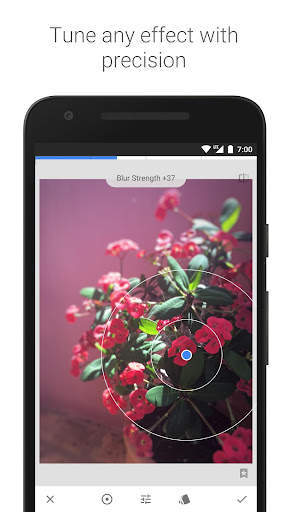
Snapseed, Google की ओर से विकसित किया गया एक पूर्ण और पेशेवर फ़ोटो संपादक है.
== मुख्य सुविधाएं==
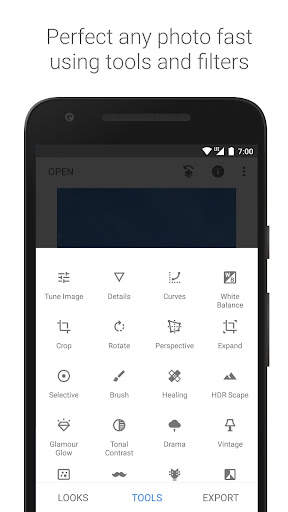
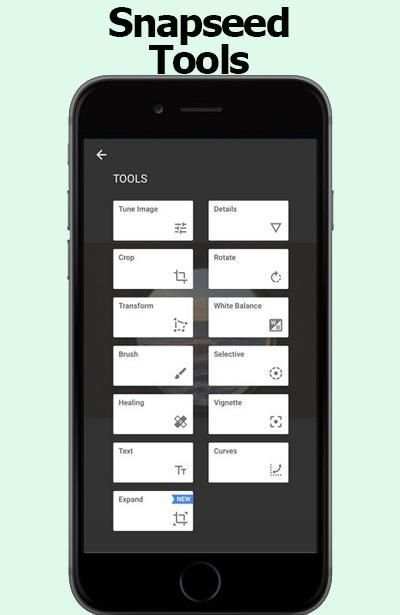
• 29 टूल और फ़िल्टर, जिनमें ये शामिल हैं: हीलिंग, ब्रश, संरचना, HDR, परिप्रेक्ष्य (नीचे सूची देखें)
• JPG और RAW फ़ाइलें खोलना
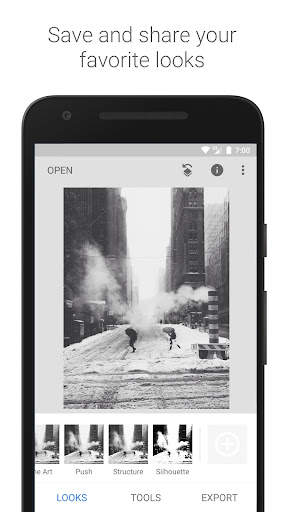
• अपने व्यक्तिगत रूप सहेजें और उन्हें बाद में नई फ़ोटो पर लागू करें
• चयनात्मक फ़िल्टर ब्रश
• सभी शैलियों में महीन, सटीक नियंत्रण से फेरबदल किया जा सकता है
== टूल, फ़िल्टर और चेहरा ==
• RAW डेवलप – मूल कैमरा फ़ाइलों को खोलें और उनमें फेरबदल करें; उन्हें बिना क्षति के सहेजें या JPG के रूप में निर्यात करें
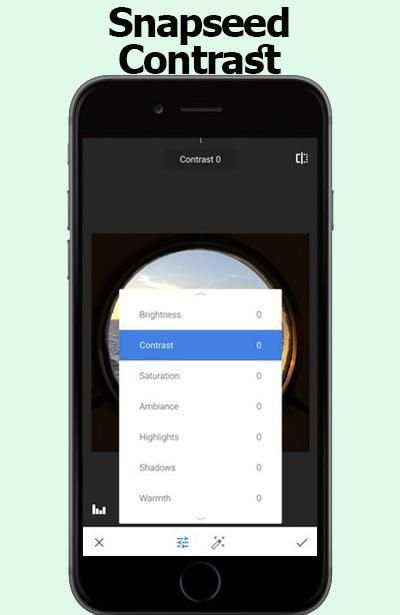
• चित्र ट्यून करें – महीन, सटीक नियंत्रण से एक्सपोज़र और रंग को अपने आप या मैन्युअल रूप से समायोजित करें
• विवरण – चित्रों में सतह संरचनाओं को जादुई रूप से उभारता है
• काटें – मानक आकारों में या मुक्त रूप से काटें
• घुमाएं – 90° घुमाएं या तिरछे क्षितिज को सीधा करें
• परिप्रेक्ष्य – तिरछी रेखाओं को सीधा करें और क्षितिज या इमारतों की ज्यामिति को एकदम सही करें
• श्वेत संतुलन – रंगों को समायोजित करें ताकि चित्र अधिक स्वाभाविक दिखाई दे
• ब्रश – एक्सपोज़र, संतृप्तता, चमक या गर्मायी को चयनात्मक रूप से सुधारें
• चयनात्मक – प्रसिद्ध “नियंत्रण बिंदु” प्रौद्योगिकी: चित्र पर अधिकतम 8 बिंदु लगाएं और उनमें सुधार असाइन करें, एल्‍गोरि‍दम शेष काम जादुई रूप से कर देता है
• हीलिंग – किसी समूह चित्र से बिन बुलाए मेहमान को निकालें
• विनेट – कोनों के आस–पास एक सौम्य गहरापन जोड़ें, जैसे एक सुंदर, चौड़ा अपर्चर शानदार रहेगा
• लेख – शैलीकृत या सादा, दोनों तरह का लेख जोड़ें (38 पहले से निर्धारित शैलियां)
• वक्र – अपनी फ़ोटो में चमक के स्तरों पर सटीक नियंत्रण करें
• विस्तृत करें - अपने कैनवस का आकार बढ़ाएं और नई जगह को अपने चित्र की सामग्री से चतुराई से भरें
• फ़ोटो ब्लर सुविधा – चित्रों में एक सुंदर बोकेह (पृष्ठभूमि की सौम्यता) जोड़ें, जो फ़ोटोग्राफ़िक पोर्ट्रेट के लिए आदर्श है
• ग्लैमर चमक – चित्रों में एक महीन चमक जोड़ें, जो फ़ैशन या पोर्ट्रेट के लिए बढ़िया होती है
• टोनल कंट्रास्ट – परछाइयों, मिडटोन और हाइलाइट में विवरण को चयनात्मक रूप से बेहतर बनाएं
• HDR स्केप – एक से अधिक एक्सपोज़र का प्रभाव डालकर अपने चित्रों को एक शानदार रूप दें
• ड्रामा – अपने चित्रों में प्रलय के दिन का संकेत जोड़ें (6 शैलियां)
• ग्रंज – सशक्त शैलियों और बनावट ओवरले वाला एक पैना रूप
• दानेदार फ़िल्म – असली दिखाई देने वाले दानों के साथ आधुनिक फ़िल्म का रूप पाएं
• विंटेज – 50, 60 या 70 के दशक की रंगीन फ़िल्म फ़ोटो की शैली
• रेट्रोलक्स – लाइट लीक, स्ट्रैच, फ़िल्म शैलियों से रेट्रो रूप पाएं
• नोइर – वास्तविक दिखाई देने वाले दानों और वॉश प्रभाव से श्वेत–श्याम फ़िल्म के रूप
• श्वेत–श्याम – सीधे डार्करूम से निकला क्लासिक श्वेत–श्याम रूप
• फ़्रेम – समायोजित करने वाले आकारों वाले फ़्रेम जोड़ें
• दोहरा एक्सपोज़र – फ़िल्म शूट करने और डिजिटल इमेज संसाधन से प्रेरित मिश्रण मोड में से चुनाव करके दो फ़ोटो को मिलाएं
• चेहरा सुधार – आंखों पर फ़ोकस डालें, चेहरा संबंधी विशिष्ट रोशनी डालें, या त्वचा को मुलायम बनाएं
• चेहरा पोज़ – त्रिविमीय मॉडल के आधार पर पोर्ट्रेट के पोज़ को ठीक करें

...

👉 For More Detail of Snapseed

#2 Apk Installer

Apk Installer
Rating: star 4.5 | Version: 5.3.2c | Size: 5.3MB
Apk Installer स्क्रीनशॉट 1 Apk Installer स्क्रीनशॉट 2 Apk Installer स्क्रीनशॉट 3

APK इंस्टॉलर अपने SDCard
ऐप फ़ीचर से APK फ़ाइलों को खोजने और स्थापित करने का एक त्वरित तरीका है:
• सही एपीके फ़ाइल दिखाएं (भ्रष्ट फ़ाइल छोड़ें)
ईडी स्थिति
• मुक्त अंतरिक्ष मेमोरी
नोट प्रदर्शित करें: हम डाउनलोड करने के लिए कोई एपीके फ़ाइल प्रदान नहीं करते हैं।कृपया हमें नकारात्मक समीक्षा दें।

...

👉 For More Detail of Apk Installer

#3 Apk Extractor

Apk Extractor
Rating: star 4.0 | Version: 4.21.08 | Size: 2.5MB
Apk Extractor स्क्रीनशॉट 1 Apk Extractor स्क्रीनशॉट 2 Apk Extractor स्क्रीनशॉट 3

APK Extractor will extracts APK that are installed on your android device and copies them to your SD card.
★ Fast and easy to use.
★ Extracts almost all application,including system applications.
★ No ROOT access required.
★ By Default Apk's will be saved in /sdcard/ExtractedApks/.
★ Provided Search option to search applications.
★ Compatible with latest version of Android 7.0
★ Saved apk format AppName_AppPackage_AppVersionName_AppVersionCode.apk.
★ Can extract multiple/all APK's by holding long click on any item.
Interested in translating the application in your local language ? Strings are available in GitHub https://github.com/meher421/ExtractorStrings/tree/master/values .Please email me translated strings

...

👉 For More Detail of Apk Extractor

#4 Tips for Snapseed 2018

Tips for Snapseed 2018
Rating: star 3.0 | Version: 1.0 | Size: 2.2MB
Tips for Snapseed 2018 स्क्रीनशॉट 1 Tips for Snapseed 2018 स्क्रीनशॉट 2 Tips for Snapseed 2018 स्क्रीनशॉट 3

Tips snapseed 2017 is the best guide application All in one for information you require consider how to using snapseed to detail. With this guide you will locate a couple of clues, traps to using snapseed.
This application oversee snapseed is permitted to download and use with various class elective menu. There is no limitation to access in-application content. You can use it at whatever point and wherever you have to improve your capacities.
the guide snapseed is an aggregate and master photo publication director made by Google
== snapseed TOOLS, FILTERS AND FACE ==
• Expand - increase the measure of your canvas and finish off the new space in sagacious courses with substance of your
The Snapseed interface is exceptionally instinctual. Without a doubt, even before you start wearing down your first picture, you can tap the INSIGHTS catch to take a gander at some particularly illuminating bearings on getting up to speed with the distinctive parts of the application (from taking in the interface to various how-tos on a noteworthy number of the application channels).
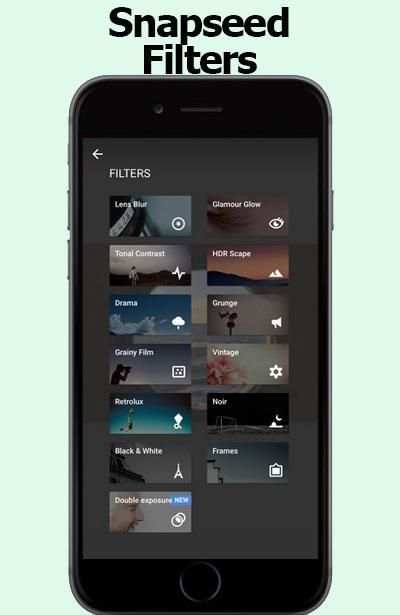
Counting channels is correspondingly as straightforward with Snapseed. With your photo open in modifying mode, look down until the point when the moment that you find the channel you have to apply. We should open a substitute photo and apply the Lens Blur channel. This one is fairly shaky by they way you adjust the diverse settings of the channel.
Open your photo for changing, look down, and tap the Lens Blur channel. In the accompanying window,
snapseed coordinate give a couple of clues for modify your photographs .
Channels are an exceptional technique to quickly change the look and feel of your Phone photos, and the free Snapseed application offers a unimaginable assurance of presets for modifying your photographs. Regardless, these aren't just standard presets! They're totally versatile and offer an enormous level of flexibility and creative energy, especially when joined with the Stacks Brush gadget which allows you to apply effects to just certain parts of your photo. In this instructional exercise you'll locate the most extreme limit of Snapseed's channels, and how they can fundamentally adjust the perspective of your photos.
Other Snapseed changes for the two iOS and Android fuse better face revelation for the application's Face channel,
Nik Software, the San Diego-based association behind the free Snapseed application, was bought by Google in 2012. For a few years following the acquirement, few updates were issued for the application, driving many to consider whether the item would be secured.
Snapseed was a Google acquirement went for expanding Google's photo limits, and now it's a riddle Google application with an extraordinary photo changing suite you can use on your phone. Some view this as just an answer, in any case I view this as a bit of a procedure with effort by Google to upgrade their photo modifying and sharing programming when all is said in done.
All things considered, what is Snapseed?
Snapseed is a phone application open on both Android and IOS. It used to be $4.99 download, yet due to Google's general assessing methodology of "we'll comprehend how to benefit out of it later," it's as of now free.
Snapseed is much of the time portrayed as a contender. That is insignificantly legitimate in that the two applications empower you to take pictures from your phone or tablet, apply channels, and offer them on different stages. I'd say is fundamentally easier to use in a point, channel, share sense. Snapseed is a more prominent measure of a specialist's contraption with additionally created features. It's the application you use when you have to set aside greater opportunity to make something to some degree more advanced.
Basic NOTE:
this application is juste coordinate.
Snapseed isn't the expert application is only an instructive application to help people to altogether comprehend for Snapseed.

...

👉 For More Detail of Tips for Snapseed 2018

#5 APK Extractor, APK Extraction

APK Extractor, APK Extraction
Rating: star 4.3 | Version: 1.0.6 | Size: 5.0MB
APK Extractor, APK Extraction स्क्रीनशॉट 1 APK Extractor, APK Extraction स्क्रीनशॉट 2 APK Extractor, APK Extraction स्क्रीनशॉट 3

Extract apps installed in Smart Phone and Tablet as APK file.
Extracted file will be saved in SD card.
And Extracted file can be shared.
This app show apk files in the phone and make installing or removing app easy.
APK Extractor extracts the apps in Android device as APK format and the extracted apk file will be saved in SD card.
1. Key Features
1) Fast and easy to use.
2) Possible to extract almost of app including system app.
3) No need root authorization.
4) Default address for extracted apk saved is /sdcard/AppFactoryExtractor/
5) Default saved apk file is ‘app name_app package_app version name_app version code.apk’.
2. You can also see installed application information.
1) Application Name
2) Package Name
3) Version
4) Required Permissions
5) Taget SDK Version
6) Path Info
7) Installed Time
8) Last Modified Time
APK Extractor, APK Manager, APK Extraction

...

👉 For More Detail of APK Extractor, APK Extraction

Search Results

1/20

You may like

डाउनलोड वेब स्टोर में समर्थित नहीं है!
एक क्लिक में एपीके एंड ओबीबी फाइलें डाउनलोड करने के लिए 9Apps के नवीनतम संस्करण का प्रयोग करें
DOWNLOAD 9APPS