









DOWNLOAD IS NOT SUPPORTED IN WEB STORE!
Use the latest version of 9Apps to download APK&OBB file of games in one click!
DOWNLOAD 9APPS
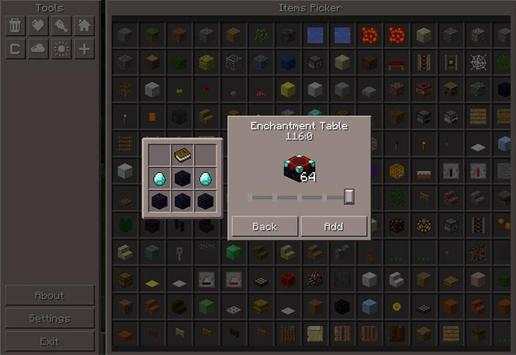
Pocket Manager is the perfect addition to the game if you want to have greater control over your gameplay in minecraft 0.14.0. By the use of an easy to use interface you can add items to your inventory, switch gamemode, manage the weather and access many other neat features which greatly enhance the efficiency of gameplay management.
Features
Item picker
Clear inventory
Restore health & hunger
Set spawnpoint
Switch gamemode
Change weather
Time set
Customizable GUI
How to use Pocket Manager?
Once you’ve loaded up a world there will be a PM (Pocket Manager) button in the bottom-right corner of the screen. The position of the button can be customized in the settings of this mod.
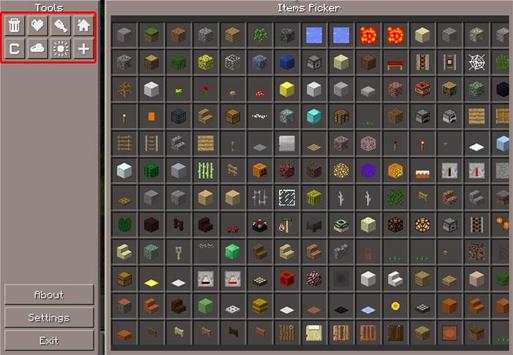
The graphical user interface is very easy to understand.
Select one of the items in the list. Use the slider to change the amount you want to receive. Here you can also see the recipe for the item if one exists.
And on the left there’s a couple of different buttons which lets you change gamemode, weather, restore health and hunger and setting a new spawnpoint.
This application is not affiliated in any way with Mojang AB. The Minecraft Name, the Minecraft Brand and the Minecraft Assets are all property of Mojang AB or their respectful owner. All rights reserved. In accordance with http://account.mojang.com/documents/brand_guidelines
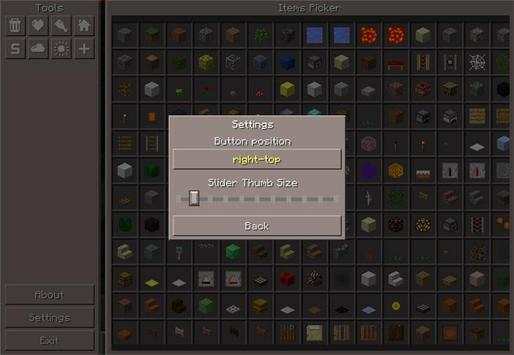
Use the settings to configure the position of the PM button and the size of the slider button.
To exit Pocket Manager simply press the Exit button.


