










DOWNLOAD IS NOT SUPPORTED IN WEB STORE!
Use the latest version of 9Apps to download APK&OBB file of games in one click!
DOWNLOAD 9APPS
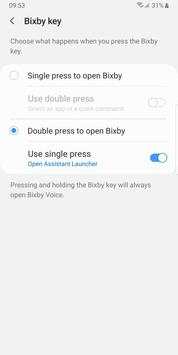
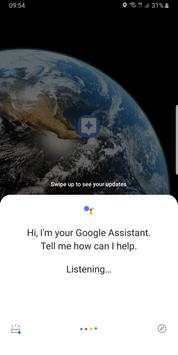
Samsung now lets you set up your Bixby button to launch any app or task, except one: Google Assistant.
This app launches Google Assistant.
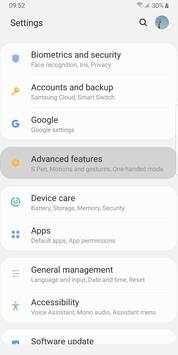
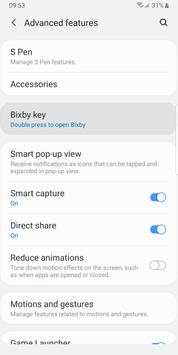
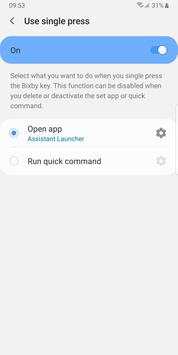
Now you can follow these steps to assign this app to your Bixby button. As a result, that button will launch Google Assistant:
- Go to you device's Settings
- Select "Advanced features"
- Select "Bixby key"
- Select "Double press to open Bixby" and enable "Use single press"
- Touch "Use single press"
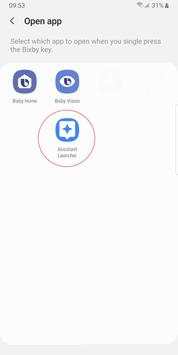
- Select "Open app" and touch the settings icon
- Select this app: "Assistant Launcher"
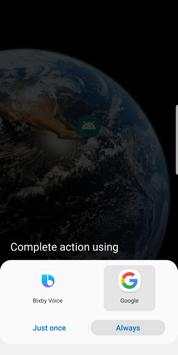
Done! Now touch your Bixby button. The first time you may be asked to use Bixby or Google's Assistant. Select Google Assistant and touch "Always".
![How to get Google Assistant on any phone in 30 Seconds, [Easy Method] screenshot 1](https://i.ytimg.com/vi/wLuT8WiVfug/mqdefault.jpg)


First release


