PhiShot icon

PhiShot

1.3.1 for Android
2.9 | 50,000+ Installs | Reviews

UNISOLUTIONS

Description of PhiShot

Search for golden ratio!
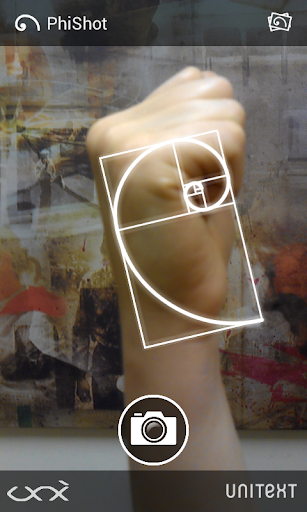
The mobile application „PhiShot“ is an educational application which introduces the user with the ways of applying the golden ratio. By using this mobile application, users can easily create their picture based on the principles of the golden ratio, or they can search for any objects, that have the proportion of the golden ratio and make a photo of it. The application allows you to save the picture in your mobile gallery and share it with your friends on social networks.
It is an ideal tool for understanding the nature, architecture and at the same time creating perfect compositions.
Idea: Kaunas Biennial, http://www.bienale.lt/2013/en/
Code: UNISOLUTIONS, http://www.unisolutions.eu/
Design: Mamaika creative team, http://www.mamaika.lt/

What's New with PhiShot 1.3.1

Version 1.3.1 (02/13/2017)
- Added link to Privacy Policy.
Version 1.3 (06/17/2015)
- New gallery slider.
Version 1.2 (04/13/2015)
- Ability to draw Golden Spiral on any existing image on device.
- Compatibility with Android 5.1 (Lollipop).
Version 1.1 (11/11/2013)
- Ability to toggle between back and front camera.
- Compatibility with Android 2.2 (Froyo).


Information

  • Category:
    Education
  • Latest Version:
    1.3.1
  • Updated:
    2017-02-13
  • File size:
    799.5KB
  • Requirements:
    Android 2.2 or later
  • Developer:
    UNISOLUTIONS
  • ID:
    eu.unisolutions.phishot
  • Available on:
Reviews
  • avatar
    disappointing
    2020-08-07 04:40
  • avatar
    Useful for composition education. Useless for taking photos. Why the heck would they overlay the sequence on everything and not allow you to remove them but keep the photo? If you could integrate with the Android camera, even better. I'd pay for an app to do that.
    2020-06-21 05:35
  • avatar
    This is exactly what I was looking for when I had finished an art piece but I was dissapointed when the golden ratio overlay lined up symmetrically, but not parallel to what I had drawn. Why isnt the an ability to invert the g. r. o.? I would like to see a flip button or something to adjust the g.r.o. without having to mirror my photo to work with the app
    2020-03-01 09:37
  • avatar
    good
    2019-08-07 10:16
  • avatar
    Constantly crashes. Will not upload photos. I'm running the latest version of Android - Android 9.
    2019-04-21 08:34
  • avatar
    It works... read the instructions folks! Long press flips the grid, pinching will resize. Not perfect yet (the branding overlay interferes with composition) but still a helpful tool for quickly checking images on photo.
    2019-04-06 07:59