

DOWNLOAD IS NOT SUPPORTED IN WEB STORE!
Use the latest version of 9Apps to download APK&OBB file of games in one click!
DOWNLOAD 9APPS

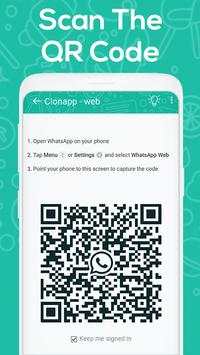
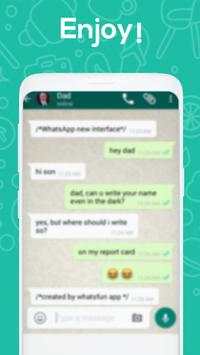
Some people might want to open multiple WhatsApp account in same device or same WhatsApp account in multiple devices then this is DOWN TO EARTH for them. You can use same WhatsApp account in multiple device or multiple WhatsApp account on same device.
Whats Web Clone Messenger Features:
- read WhatsApp message
- message to other user
- change WhatsApp status
- change WhatsApp profile picture
- download images/videos
How to use Whats Web Clone Messenger?
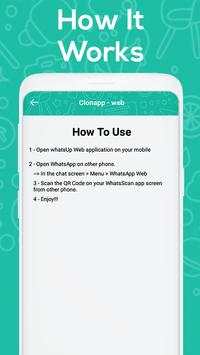
1. Open Preferred WhatsApp
2. In the chat your screen open menu so choise WhatsApp Web
3. So lets scan the QR code on your Whats Web Clone Messenger
4. Finish lets enjoy the Whats Web Clone Messenger
Why I Need Whats Web Clone Messenger?
- open more than one WhatsApp account in the same mobile.
- open one account in more than one devices.
- parental control other WhatsApp account
Note: Whats Web Clone Messenger is not official WhatsApp Application or not associated with WhatsApp and/or WhatsApp Inc.. This Application is just for public interest, for easily spy/ parental control/ monitor/ knowledge purpose only. This Application is using web interface of official WhatsApp website only.
Whats Web Clone Messenger not use to hack Anything it just display save files in application.
ENJOY!!






Facebook Lite
4.02.5MB

Candy Crush Saga
4.491.1MB

imo beta -video calls and chat
4.394.0MB

Stickman Fighting
3.059.6MB

ShopClues
3.816.4MB

Konuşan Tom
3.963.0MB

Dearmet: Video Chat, Live Talk
4.043.4MB

Temple Run 2
4.4122.1MB

Quikr – Search Jobs, Mobiles,
4.120.8MB

Offline Music Mp3 Player- Muso
4.535.9MB