powermanagerservice.wakelocks wakelock on 9Apps

Free download latest powermanagerservice.wakelocks wakelock for Android here and enjoy it with your phone. Below you can download a list of top and latest apps related to powermanagerservice.wakelocks wakelock . 9APPS is a fast, safe app store. With 9APPS, you can save a lot of time on searching and downloading apps.

#1 Screen WakeLock
Screen WakeLock
Rating: star 4.2 | Version: 1.2 | Size: 426.7KB
Screen WakeLock screenshot 1 Screen WakeLock screenshot 2 Screen WakeLock screenshot 3

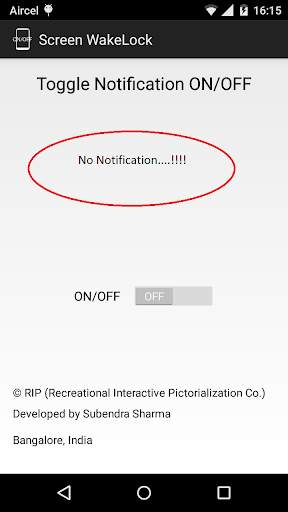
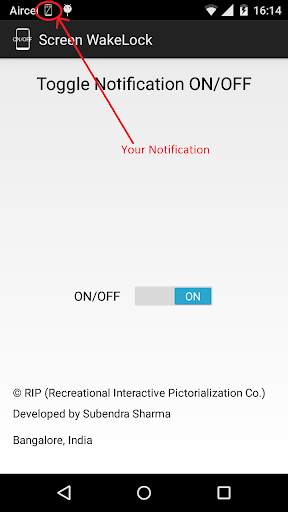
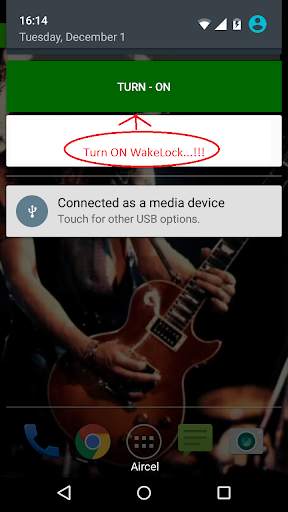
When You Install this app you'll get to choose to put a notification button which helps you to turn the Screen WakeLock ON or OFF so that you can work on your phone without the screen dimming if you have the habit of making the screen dim after a short period of time like me (15 seconds)... It has an awesome UI which informs if it is ON which consumes battery and lets you switch it off when your done working....

...

👉 For More Detail of Screen WakeLock

#2 Wakelock Detector [LITE]

Wakelock Detector [LITE]
Rating: star 4.7 | Version: 2.0.4 | Size: 2.0MB
Wakelock Detector [LITE] screenshot 1 Wakelock Detector [LITE] screenshot 2 Wakelock Detector [LITE] screenshot 3

จุดประสงค์ของ [Lite] รุ่นนี้คือการทำให้ WakeLock Detector ทำงานโดยไม่มีรูท
สิ่งนี้ต้องการให้คุณทำตามขั้นตอนเพื่อให้แอปนี้ทำงานได้โดยไม่มีรูท
เปิดลิงค์ด้านล่างและปฏิบัติตามการนำเสนอเพื่อให้แอปนี้ทำงาน !!
http://goo.gl/yqdh2f
_______________________________________
เคยสงสัยหรือไม่ว่าหน้าจอสมาร์ทโฟนของคุณจะไม่ปิดโดยอัตโนมัติเมื่อควรมีหน้าจอตื่นขึ้นมาทันทีหรือคุณค้นหา แบตเตอรี่โทรศัพท์ของคุณระบายแม้ว่าคุณจะออกจากแอพและปิดหน้าจอหรือไม่? นี่อาจเป็นเพราะ wakelock ถือแอพ "Wakelock Detector" ช่วยให้คุณตรวจจับแอพพลิเคชั่นการระบายแบตเตอรี่ในโทรศัพท์ Android ของคุณโดยตรวจสอบประวัติการใช้งาน Wakelock ตอนนี้คุณสามารถค้นหาสิ่งที่ทำให้โทรศัพท์ของคุณตื่นตัวและระบายแบตเตอรี่ของคุณเมื่อไม่ได้ใช้งาน!
"Wakelock" เป็นกลไกของบริการการจัดการพลังงานในระบบปฏิบัติการ Android ซึ่งสามารถใช้เพื่อรักษา CPU Awake (บางส่วน Wakelock) และเก็บหน้าจอ (เต็ม wakelock) แอปพลิเคชันที่ใช้สิทธิพิเศษ WakeLock นำไปสู่สถานการณ์ที่ CPU หรือหน้าจอโทรศัพท์ยังคงทำงานอยู่โดยไม่มีความรู้ของผู้ใช้และทำให้เกิดการระบายแบตเตอรี่ที่น่าทึ่ง
"Wakelock Detector" แสดงสถิติการใช้งาน Wakelock สำหรับแอปพลิเคชันทั้งหมด บูต โดยค่าเริ่มต้นจะแสดงการเรียงลำดับ CPU Wakelocks ตามเวลาการใช้งานที่ยาวที่สุด นอกจากนี้คุณสามารถเลือกประเภท WakeLock หน้าจอเพื่อดู Wakelocks ที่เกี่ยวข้องกับหน้าจอ ตัวอย่างเช่นหากหน้าจอของคุณยังคงอยู่แม้หลังจากการหมดเวลาหน้าจอหรือหน้าจอของคุณจะเปิดตามแบบสุ่มด้วยตัวเองคุณสามารถเลือกประเภท WakeLock หน้าจอที่ด้านบน (ไอคอนความสว่าง) เพื่อดูว่าแอพใดที่ใช้ WakeLock หน้าจอ นอกจากนี้หากคุณมีความสนใจในการใช้งานแอปพลิเคชันในปัจจุบันคุณสามารถเปลี่ยนประเภทการเรียงลำดับเป็น "ใช้งาน" ซึ่งแสดงแอปพลิเคชันที่ใช้งานอยู่ด้านบน สำหรับรายละเอียดเพิ่มเติมโปรดดูคำถามที่พบบ่อยภายในการตั้งค่า
คุณสมบัติหลัก:
# แสดงทั้ง CPU WakeLock (Wakelock บางส่วน) และ (เต็ม wakelock);
# ผสาน wakelocks ของแอพที่สอดคล้องกันเป็นหนึ่งในมุมมองที่สอดคล้องกัน สำหรับประสบการณ์การใช้งานที่ดีขึ้น
# แอปพลิเคชันที่ใช้งานอยู่ในปัจจุบันจะแสดงเป็นสีแดง
# อนุญาตให้เลือกตัวเลือกการเรียงลำดับได้ง่ายโดยการรันสถานะ, เวลา wakelock และลำดับตัวอักษร;
วิธีการใช้งาน:
# 1 ชาร์จโทรศัพท์ของคุณเหนือ 90% และถอดสายเคเบิล (หรือเพียงแค่รีบูตโทรศัพท์)
# 2 ให้เวลา (1-2 ชั่วโมง) เพื่อสะสมสถิติการใช้งาน wakelock บางอย่าง
# 3 เปิด "WakeLock เครื่องตรวจจับ "
# 4 ตรวจสอบแอพที่ด้านบนหากพวกเขาแสดงเวลาการใช้งาน WakeLock ที่ยาวมากคุณพบว่าสาเหตุของการระบายแบตเตอรี่ของคุณ!
#notice
เรากำลังดำเนินการปรับปรุงประสิทธิภาพการทำงาน ของ "Wakelock Detector" โดยการเพิ่มคุณสมบัติใหม่เกี่ยวกับปัญหา WakeLock ที่ผู้ใช้มักจะเผชิญ เราพยายามติดตามความคิดเห็นทั้งหมดของคุณ และเรารู้ว่าแอปพลิเคชันยังไม่เหมาะ เราขอขอบคุณหากคุณส่งอีเมลถึงเราก่อนที่จะให้ความคิดเห็นเชิงลบใน Play Store ความคิดเห็นของคุณยินดีต้อนรับเสมอ!
* ผู้ใช้ MIUI - ตรวจสอบให้แน่ใจว่าเปิดใช้งานบริการแบตเตอรี่
# รีวิว
XDA - http://www.xda-developers.com/android/defend - แบตเตอรี่ของคุณด้วย wakelock-detector /
howtogeek - http://www.howtogeek.com/142654/find-out-which-apps-are-keeping-your-android-awake-with-wakelock- เครื่องตรวจจับ / LifeHacker - http://lifehacker.com/5993706/wakelock-detector-shows-you-the-apps-that-kep-your-phone-awake
Dottech - http://dottech.org / 103671 / Android-Review-wakelock-detector / temefy - http://temefy.com/defend-your-battery-with-wakelock-detector
Facebook - http://www.facebook.com/ Wakelockdetector
Wakelock PPT [แนะนำ] - http://goo.gl/7wggz

...

👉 For More Detail of Wakelock Detector [LITE]

#3 Wakelock Detector [ROOT]

Wakelock Detector [ROOT]
Rating: star 5.0 | Version: 2.0.1 | Size: 1.5MB
Wakelock Detector [ROOT] screenshot 1 Wakelock Detector [ROOT] screenshot 2 Wakelock Detector [ROOT] screenshot 3

Notice for Android KitKat or later:
Need root access due to permission changes!
More details on our blog:
http://uzumapps.blogspot.jp/2015/07/what-happened-to-wakelock-detector.html
_______________________________________
Ever wondered why your smartphone screen doesnt turn off automatically when it should have, the screen wakes up all of a sudden or you find your phone battery drained even when you exited apps and turned off the screen? This might be due to wakelock holding apps. ”Wakelock Detector” helps you to detect battery draining apps in your Android phone by checking wakelock usage history. Now you can easily find out what keep your phone awake and drain your battery when it is idle!
“Wakelock” is a mechanism of power management service in Android OS, which can be used to keep CPU awake (Partial wakelock) and keep the screen on(Full wakelock). Applications which use wakelock privilege improperly leads to situations where the CPU or phone screen stays active without user's knowledge
and thus causing dramatic battery drain.
“Wakelock Detector” shows wakelock usage statistics for all applications, which ever held wakelock since boot. By default it displays CPU wakelocks sorting by the longest usage time. Further, you can choose Screen wakelock type to see screen related wakelocks. For instance, if your screen is keeping on even after screen timeout or your screen turns on randomly by itself, then you can choose Screen wakelock type on the top (Brightness icon) to see which apps are using
screen wakelock. Furthermore, if you are interested in currently running applications then you can change sorting type to "Active" which shows active running applications on the top. For further details please refer to FAQ inside Settings.
Main features:
# shows both CPU wakelock (Partial wakelock) and
(Full wakelock) ;
# merges wakelocks of corresponding app into one expandable view for better user experience;
# currently active running applications are shown in red color;
# allows easy sorting options by Running state , Wakelock time and
Alphabetical order;
How to use:
#1 Charge your phone above 90% and unplug cable (or just reboot the phone)
#2 Give it a time (1-2 hours) to accumulate some wakelock usage statistics
#3 Open “Wakelock Detector”
#4 Check the apps on the top, if they show very long wakelock usage time then you found the cause of your battery drain!
#Notice
We are working on improving the performance of the “Wakelock Detector” by adding new features regarding wakelock issues users usually face. We are trying to follow up all your comments. And we know that the application is not ideal yet. We would appreciate if you send us email before giving negative comments in the Play Store. Your feedbacks are always welcome!
* MIUI users - Make sure that battery service is turned on.
#Reviews
XDA - http://www.xda-developers.com/android/defend-your-battery-with-wakelock-detector/
HowToGeek - http://www.howtogeek.com/142654/find-out-which-apps-are-keeping-your-android-awake-with-wakelock-detector/
LifeHacker - http://lifehacker.com/5993706/wakelock-detector-shows-you-the-apps-that-keep-your-phone-awake
DotTech - http://dottech.org/103671/android-review-wakelock-detector/
Temefy - http://temefy.com/defend-your-battery-with-wakelock-detector
Facebook - http://www.facebook.com/wakelockdetector
Wakelock PPT [recommended] - http://goo.gl/7WgGz
**We are planning to keep this app free and free of ads. If you like this app and want to show your appreciation to developers who invest their time to maintain and improve this app, then please consider donating by purchasing extra features like widgets and knowledge base**
** Translation **
You can translate or improve the existing one here:
https://osumqlt.oneskyapp.com

...

👉 For More Detail of Wakelock Detector [ROOT]

#4 Wake Lock - Keep Screen On, Keep Screen Awake

Wake Lock - Keep Screen On, Keep Screen Awake
Rating: star 3.4 | Version: 1.0 | Size:
Wake Lock - Keep Screen On, Keep Screen Awake screenshot 1 Wake Lock - Keep Screen On, Keep Screen Awake screenshot 2 Wake Lock - Keep Screen On, Keep Screen Awake screenshot 3

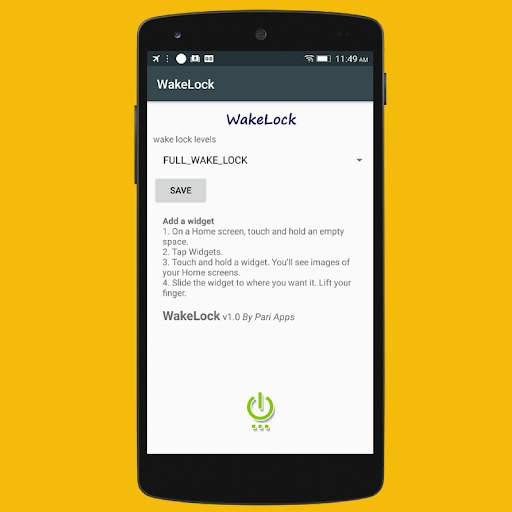
คุณสมบัติ:
ไฟหน้าจอของคุณเปลี่ยนไปอย่างถาวร
Keep Backlight ของแป้นพิมพ์ของคุณเปิดอยู่อย่างถาวร (สำหรับรุ่นโทรศัพท์บางรุ่นเท่านั้น !!!)
Select Wake Lock Level
ฟังก์ชันการทำงานเพิ่มเติม - แอปพลิเคชั่นนั้นง่ายมีเสถียรภาพน้ำหนักเบาและทำงานบนอุปกรณ์ Android ทั้งหมด
แอปพลิเคชั่นขนาดเล็กนี้จะช่วยให้คุณหลีกเลี่ยงโหมดสลีป
ง่ายและรวดเร็ว: คุณสามารถเพิ่มวิดเจ็ตเพื่อเปิด / ปิดการใช้งานเพื่อ 'เก็บหน้าจอ'
สิ่งสำคัญ: คุณยังสามารถปิดหน้าจอของคุณด้วยตนเองแม้ว่าจะเปิดแอป

...

👉 For More Detail of Wake Lock - Keep Screen On, Keep Screen Awake

Search Results

1/1

You may like

DOWNLOAD IS NOT SUPPORTED IN WEB STORE!
Use the latest version of 9Apps to download APK&OBB file of games in one click!
DOWNLOAD 9APPS