








DOWNLOAD IS NOT SUPPORTED IN WEB STORE!
Use the latest version of 9Apps to download APK&OBB file of games in one click!
DOWNLOAD 9APPS

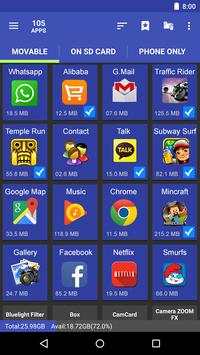
Move app in the easiest way。
Feature
*******************
• Move apps to SD card
• Move apps to phone internal storage
• Sort app by movable, name, size and time
• User can custom [Install time] [Package name] [Apk path] to show in list
• Show app details: size, install time, package, apk path.
• Open app
• Search in market
• Search in website by apk name, package name, app name
*******************
If we granted root permission, we can move multi-app in one click, and can move almost all apps installed.
If you get "Sdcard share the same disk with os", means that Android os set up ***default*** SD card and system partition in one disk, So we can't move apps from system to default SD card, cause they are in the same disk.
Move app in the easiest way in the easiest way
Many Android phones come with a paltry 8 or 16GB of storage, while even 32GB isn't enough for many users once they start downloading applications, taking high-resolution photos and videos, and sideloading music. Fortunately, the vast majority of Android phones come with a micro SD card slot, which lets you bolt on additional storage.
Sometime your phone memory or your SD card are full not space to move the data phone to SD card to use this application.
Move Application To SD CARD allows you to move the app from the phone memory to SD card.


Bug Fix
New File Transfer System


