DOWNLOAD IS NOT SUPPORTED IN WEB STORE!
Use the latest version of 9Apps to download APK&OBB file of games in one click!
DOWNLOAD 9APPS


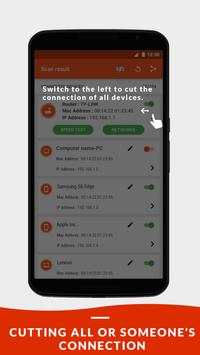
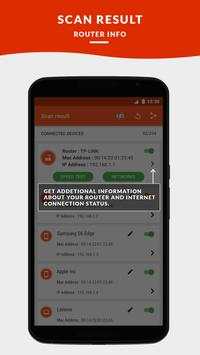
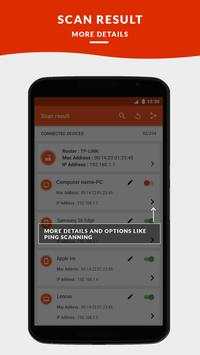
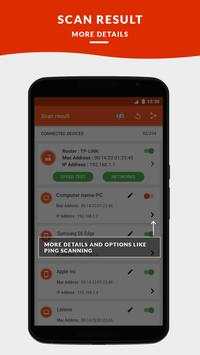
Do in-depth wifi analysis with Pixel NetCut, one of the best
wifi analyzer, wifi scanner
, and
wifi monitor
apps on Google Play. See all of the devices connected to your wifi network and know exactly who is using your network.
Block wifi users
(intruders, stealers) and
deny their access.
The remote disconnecting of unwanted users is available for rooted devices only.
SIMPLE, IN-DEPTH WIFI MANAGEMENT (DENY USERS)
Note: Root is required
Features
:
* Full device details including
IP address
,
MAC address
,
Device Name
,
Device Manufacturer
,and more.
*Check your Internet Connection.
*Access fine location map permissions .
*Get detailed information about your current
ISP Provider
.
*Get Your
Public IP
Address.
*
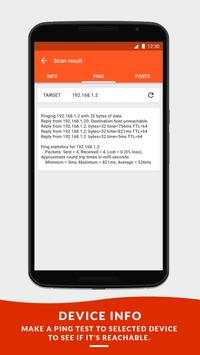
Ping
test for your network quality.
* Cut Internet for
all devices
on the Network.
*
Internet Speed Test
, Download and Upload Test.
*Check your network for intruders.
*Basic information about your device network.
*Watch all devices on your network.
*Custom names of your discovered devices.
*Get manufacturer Details of your discovered device.
* if you don't want to see the ads you can tap on the ADS button appear in the top front to purchase the PRO version.
----------------------------------------------------------------------------
Wifi management has never been easier. Pixel NetCut (ROOT) will show you detailed data about every user and manage wireless networks with the free
wifi scanner
and wifi analyzer tool. Answers the questions of “how can I block someone from using my wireless internet”. Exactly know who and when is using your network and block them!
HOW TO USE PIXEL NETCUT?
-------------------------------------------
1.
Welcome Screen:
In this screen, Pixel NetCut connects to your router to save
the settings. You will see a window asking you to confirm the validity of the
application (Super User) through the option (Grant).
2.
Search screen
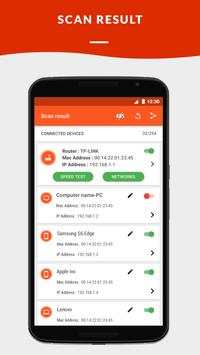
After clicking on (Scan), Pixel NetCut searches for all the
devices connected to your wifi network, and list them in the menu that
contains all their data such as: IP, Mac Address, the type of device (Android,
iPhone, PC, Router). You can also rename each device appears in the list, so
you can easily select the device later.
3.
Deny users
: Pixel NetCut can deny any user by remotely disconnecting him out of the
network and preventing him from using it.
4.
Free wifi scan
for ports on the selected device.
5.
Ping Scan
for selected device.
6. Click to visit the
open ports
in the browser.
7. View The
Manufacturer
of all devices.
---------------------------------------------------------------------------------------
The wireless network analyzer tool features will help you if you are asking yourself how can i block someone from using
my wifi
.
Monitoring device
connections
and view
hosts
information (IP ,Hostname ,Organization,Address and Location)
We are deeply committed to offer you FULL control over your wifi network.
Wireless network should never be comprised. The Wireless analyzer features included in our app will guarantee security.
Get it free NOW!
All rights reserved © pixelitc 2017