



DOWNLOAD IS NOT SUPPORTED IN WEB STORE!
Use the latest version of 9Apps to download APK&OBB file of games in one click!
DOWNLOAD 9APPS



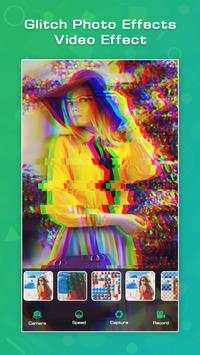

Glitch photo effect is very easy and simple to use.This application is very useful
app. Make your photo more beautiful with this application.
Features:
-Record the video.
-Change the video speed.
-Add effect.
-Crop your photo.
-Easy and simple to use.
-Capture your photo.
How to use:
-Search the glitch photo effects
- video effect in play store.
-Install this application.
-Update the glitch photo effects.
-Glitch video effect page will be open in your smart phone.
-To start this application click on camera or gallery button.
-Choice is yours.
-Select the one photo in gallery.
-Crop your selected photo.
-You can also rotate your photo.
-Click on rotate left or right button.
-Click on right arrow button.
-Glitch effect page will be open.
-Click on speed button.
-Swap the button.
-Select the effect button and select your favourite effect in the list.
-Click on capture button and take your photo.
-Click on record button and record your favourite audio.
-Your glitch video will be complete.
-Share your video on social media.
-If you delete your glitch video click on delete button.
-Your created video will be show on my creation button.



Facebook Lite
4.02.5MB

Temple Run 2
4.4122.1MB

Stickman Fighting
3.059.6MB

imo Panggilan Video & Teks
4.394.0MB

Candy Crush Saga
4.491.1MB

Offline Music Mp3 Player- Muso
4.535.9MB

Quikr – Search Jobs, Mobiles,
4.120.8MB

ShopClues
3.816.4MB

Dearmet: Video Chat, Live Talk
4.043.4MB

Talking Tom Cat
3.963.0MB