DOWNLOAD IS NOT SUPPORTED IN WEB STORE!
Use the latest version of 9Apps to download APK&OBB file of games in one click!
DOWNLOAD 9APPS
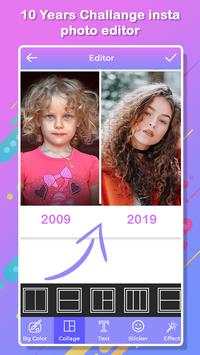



10 years challenges app is easy and simple to use. This application
is a photography comparison in two photos in which participants post
photos taken 10 years before today.
Features:
-Add the text, sticker and background.
-Different types of filter effect.
-Multiple photo selection.
-Easy and simple to use.
-Add the different types of frame.
How to use:
-Search the 10 years challenge maker app in play store.
-Install the 10 years challenge maker application.
-Update this app.
-Search the 10 years challenge app in play store.
-Two boxes will be open in your phone screen.
-Click on select 2 photo button.
-Select your favourite two photos from gallery.
-If you selected photo will be deleted click on close button.
-Click on right arrow button.
-Selected photo will be show on your screen.
-Click on BG button.
-Select your favourite colour in the list for background.
-If you want more colour click on plus button.
-Select the colour.
-Click on ok button.
-Click on collage button.
-Select the frame in the list.
-You can also set sticker.
-Click on sticker button and select the sticker.
-To add the text click on text button.
-Enter the text with different style , size, colour and shadow.
-Click on right arrow button.
-Click on effect button.
-Select your favourite effect in the list.
-Click on right arrow button.
-Click on brush button.
-Select brush button and select the brush size in the list.
-Click on colour button.
-Select your favourite colour in the list.
-You can also use undo and redo button.
-If you deleted your draw line.
-Click on delete button.
-Click on right arrow button.
-Your photo will be ready.
-Share your photo with your friends on social world.
-If you deleted your created photo click on delete button.
-Your created photo will be show on creation button.
-Click on select 3 photo button.
-Select your favourite three photos from gallery.
-If you selected photo will be deleted click on close button.
-Click on right arrow button.
-Selected photo will be show on your screen.
-Click on BG button.
-Select your favourite colour in the list for background.
-If you want more colour click on plus button.
-Select the colour.
-Click on ok button.
-Click on collage button.
-Select the frame in the list.
-You can also set sticker.
-Click on sticker button and select the sticker.
-To add the text click on text button.
-Enter the text with different style , size, colour and shadow.
-Click on right arrow button.
-Click on effect button.
-Select your favourite effect in the list.
-Click on right arrow button.
-Click on brush button.
-Select brush button and select the brush size in the list.
-Click on colour button.
-Select your favourite colour in the list.
-You can also use undo and redo button.
-If you deleted your draw line.
-Click on delete button.
-Click on right arrow button.
-Your photo will be ready.
-Share your photo with your friends on social world.
-If you deleted your created photo click on delete button.
-Your created photo will be show on creation button.