











डाउनलोड वेब स्टोर में समर्थित नहीं है!
एक क्लिक में एपीके एंड ओबीबी फाइलें डाउनलोड करने के लिए 9Apps के नवीनतम संस्करण का प्रयोग करें
DOWNLOAD 9APPS

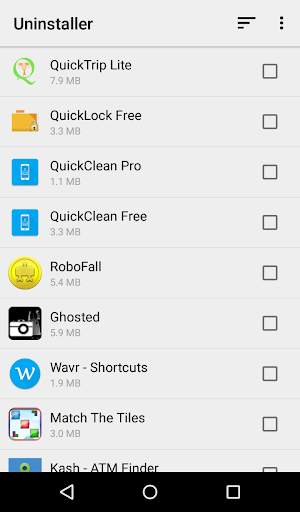
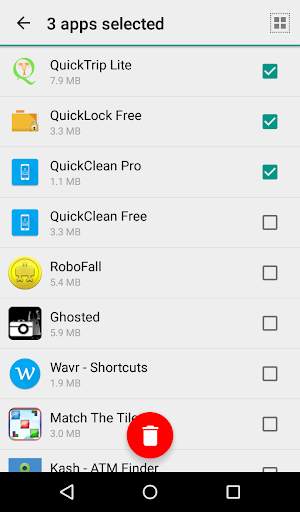
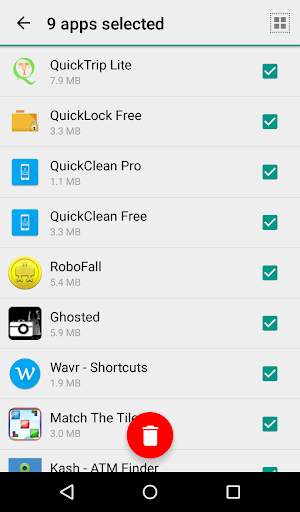
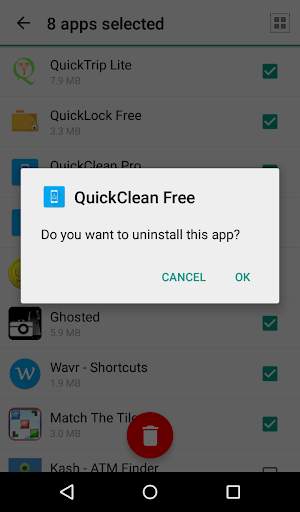
Tired of uninstalling the unwanted apps on your phone one by one? Multiple app uninstaller allows you to uninstall multiple apps at once .
FEATURES
-> Easily uninstall multiple apps at once.
-> Select all the apps that you want to uninstall and tap on uninstall to remove all those apps.
-> Elegant and easy to use UI.
-> Sort the apps you want to uninstall alphabetically or based on the app size.
-> See your recently installed apps and uninstall them accordingly.
-> Easily search for your apps using the " Quick Search Interface " .
-> Search and uninstall system apps on rooted phone. On non-rooted phone you can remove all the updates from your system app and restore it to factory version.
-> View your application's info such as package name, application version and required permissions.
FAQ
Q:
How do I uninstall multiple apps?
Select all the apps that you want to uninstall and click on the red uninstall button.
Q:
How do I remove Ads?
Go to Menu and click on remove Ads. You will be prompted for an in-app purchase. Once the purchase is successfully completed, restart the application for it to take effect.


-> SDK update
-> bug fixes


