










DOWNLOAD IS NOT SUPPORTED IN WEB STORE!
Use the latest version of 9Apps to download APK&OBB file of games in one click!
DOWNLOAD 9APPS

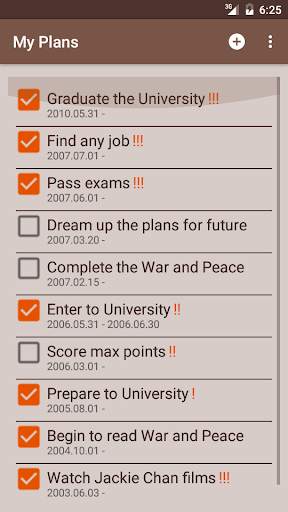
My Plans - Software application is destined for recording of plans and targets.
To add new plan you to have to follow the next instruction.
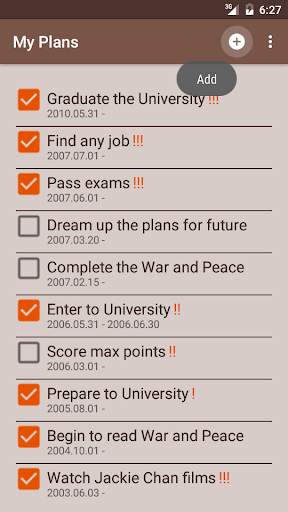
1) In main window click on the "Add" button (the round button with plus sign) at top menu.
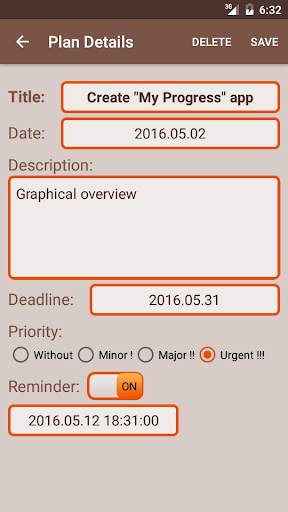
2) In new opened window fill all fields with appropriate values.
Title - The name of plan.
Date - The start date of plan.
Description - You can give some more information about plan.
Deadline - You can set up a deadline to plan.
Priority - You can choose any priority from given four ones (without, minor!, major!! and urgent!!!).
Reminder - You can switch on/off the plan reminder. In turned on case you have to pick the date and time of reminder.
3) For keeping data you have to click on the "Save" button at the top of menu.
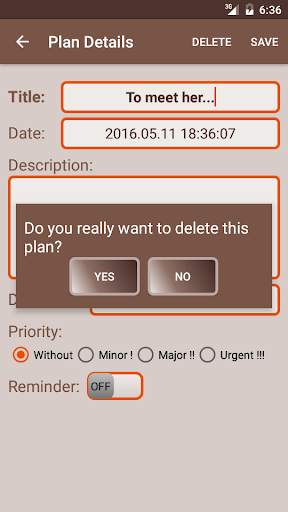
4) If you wish to delete the plan you can click on the "Delete" button at the top of menu. And then click "Yes".
That's all)



![pov: Soft song that heals your heart [playlist] screenshot 4](https://i.ytimg.com/vi/UIDcT_4DUek/mqdefault.jpg)

App has been optimized.
Improved.


