










DOWNLOAD IS NOT SUPPORTED IN WEB STORE!
Use the latest version of 9Apps to download APK&OBB file of games in one click!
DOWNLOAD 9APPS
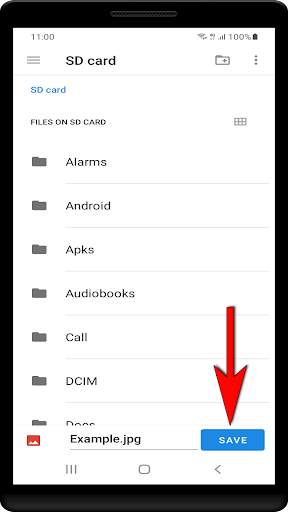
Most Android apps offer to share data. But only a few to save data on the file system. Here is the solution. This app offers to receive shared date and save it on every available disk including SD-card.
How to do:
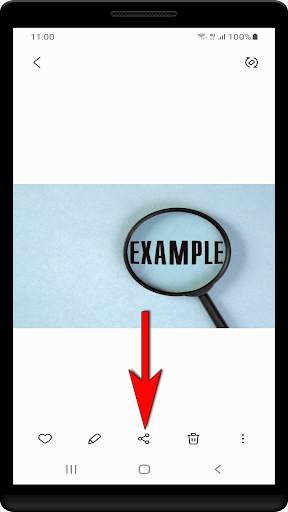
1. Share data in any app by pressing the share button.
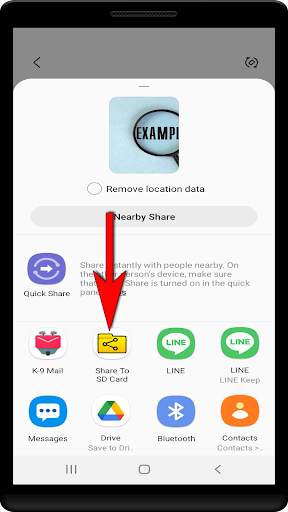
2. You will see a list of installed apps which offers support for the shared data. You will find «Share To SDCard» in this list. Just tap on it.
3. Select a destination where you want to store the file and press the «Save» button in the lower right corner. Next to the «Save» button you have also the opportunity to change the filename. If the file with this name already exists, the filename gets automatically extended with a bracket number.
Note:
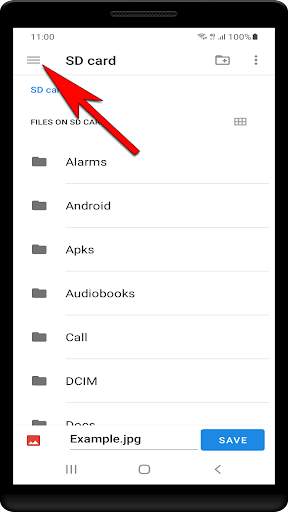
If you don't see all available disks, press the menu button in the upper left corner. Usually, there are at least 3 options. The Download-directory, the device internal storage and the external SD-Card (if available).
This application doesn't need any permission!
More information here:
https://tech-c.net/posts/share-to-sd-card-for-android/




This version contains some improvements.


