










DOWNLOAD IS NOT SUPPORTED IN WEB STORE!
Use the latest version of 9Apps to download APK&OBB file of games in one click!
DOWNLOAD 9APPS

****
before buy,
please test on trial version
****
Smart phones often do you listen to music?
The midst of listening to music, I want to hear the next song.
To do this, as shown below, you have to go through the tedious steps!
1 Remove the mobile phone from the pocket
2 Out to release the screen lock screen
3 Run the Music app widget (or looking)?
4 Finally, touch the button for the next song!
The next song! Once you install the app!
************************************
Now, without having to take out a mobile phone from the pocket!
Volume up button twice "ttaran!" You can move on to the next song by simply pressing.
************************************
To use the app after installation
Music app
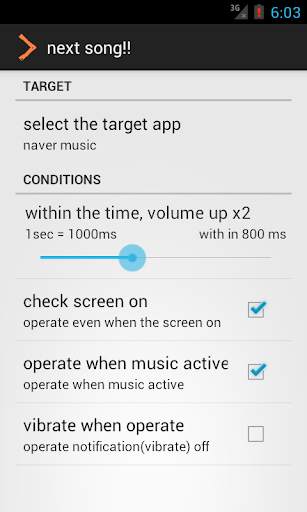
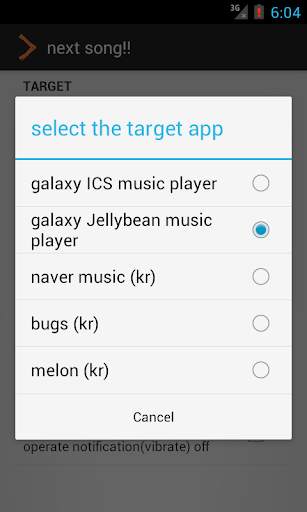
(Galaxy Default music player[ICS,JB], Bugs[kr], Melon music player[kr], Naver Music player[kr])
Press the Volume Up key twice to use, please (ttarak!)
Proceed to the next song ttaran ~
(So if you want to volume up really slowly up the volume but should be set can be adjusted.)
I have only tried to test Samsung device.
You want to install other devices, users
Please leave a comment and then check the operation on the trial version ~
Fun music to enjoy life
thank you
## Music app are currently supported:
- Galaxy Default Music Player ICS, JB
- Mazmp poweramp
- google play music
- Naver Music (korean app)
- Bugs Music (korean app)
- Melon (korean app)


![Shokz OpenRun Pro 2: How to Control Music [Play, Pause, Skip, Volume Guide] screenshot 4](https://i.ytimg.com/vi/1kL0HlmHoRA/mqdefault.jpg)


