

DOWNLOAD IS NOT SUPPORTED IN WEB STORE!
Use the latest version of 9Apps to download APK&OBB file of games in one click!
DOWNLOAD 9APPS

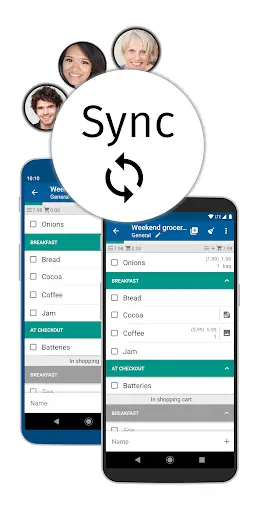
The synchronization keeps your lists up-to-date across multiple devices. In addition, you can create groups for different events, create multiple lists per group and invite multiple members. E.g. for family, roommates, office, wedding, vacation, party planning, etc.
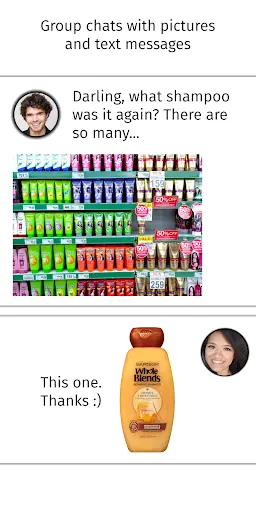
To briefly clarify, each group has its own chat with picture and text messages. Helpful if you don't know which shampoo to buy? Or who will bring the barbecue charcoal after Max has cancelled at short notice?
With the group chat you can rely on the fact that the messages are sent to all group members. You don't have to create a group in WhatsApp first. Or worry about whether everyone is on WhatsApp? Or Facebook Messenger, Telegram or Viber.
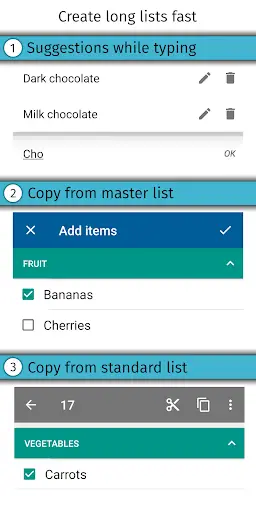
Here's how you can create long lists quickly: (see picture #3)
• Suggested items from your master list appear after you type two letters. Click on it to add the desired item.
• Select items from the master list and add them with one click.
• Create a shopping list of items you buy regularly, select all items with one click and add them to the preferred list.
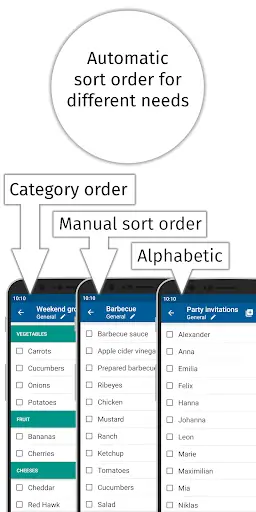
Display shopping lists either categorized, alphabetically sorted or manually sorted (see picture #4). Each shopping list can have its own sorting.
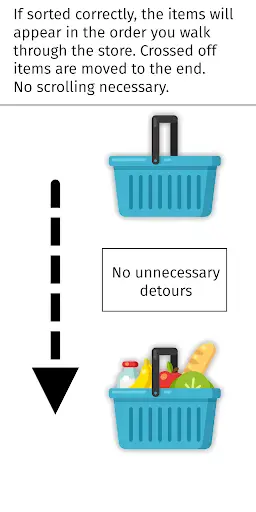
In the supermarket you do not have to scroll the list, because if you sort the items into categories and set the category order for the supermarket, the items will appear one after the other as you go through the supermarket. Crossed-off items and whole categories are placed at the end of the list (see picture #5).
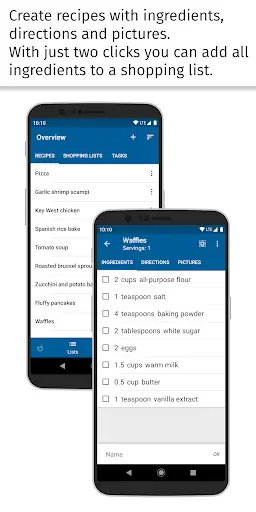
Create recipes with ingredients, directions and pictures. With a few clicks you can add all ingredients to a shopping list (see picture #6).
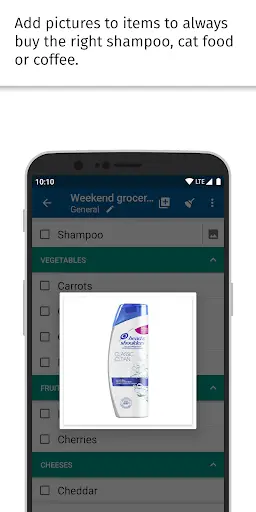
Add pictures to items to always buy the right shampoo, cat food or coffee.
Do you still have something to do? Write it down in the task lists.
There are 4 different designs including Dark theme, 4 font sizes and 6 fonts to choose from.
Additional features:
• If necessary you can edit the master list (including categories, units, stores) in the management menu
• The shopping mode enlarges the lines and makes it easier to cross off items in the supermarket
• Reminders
• Barcode scanner
• Resolve inputs with quantity and price, e.g. 500g tomatoes 2.99
• Edit all items of a shopping list in a single view
• Customize layout in settings, e.g. hide/show progress bar, hyphens, select single-line layout
• and much more!
Convinced? Try it out! If you have any questions, please contact support by email at [email protected].
Connect your Samsung Tizen Watch in Lister's settings
Individual sort order for each task list & possibility to add new tasks at the top
Changelog from previous updates:
Scroll using rotary input on watches
Christmas Theme
Rewritten Lister in Android's favorited coding language named Kotlin. Overhaul of explore view.



Temple Run 2
4.4122.1MB

Candy Crush Saga
4.491.1MB

imo beta -video calls and chat
4.394.0MB

Mushroom Takeover
4.569.0MB

ShopClues
3.816.4MB

Talking Tom Cat
3.963.0MB

Dearmet: Video Chat, Live Talk
4.043.4MB

Facebook Lite
4.02.5MB

Quikr: Homes, Jobs, Cars Etc
4.120.8MB

Offline Music Mp3 Player- Muso
4.535.9MB