Protake - Mobile Cinema Camera icon

Protake - Mobile Cinema Camera

3.0.8 for Android
3.1 | 500,000+ Installs | Reviews

Beijing Lingguang Zaixian Information Technology

Description of Protake - Mobile Cinema Camera

Protake brings the filmmaking experience of professional cinema cameras to your mobile devices.
No matter you're a daily vlogger, a commercial director, or a well-established filmmaker, you will benefit from Protake's features including:
# MODES
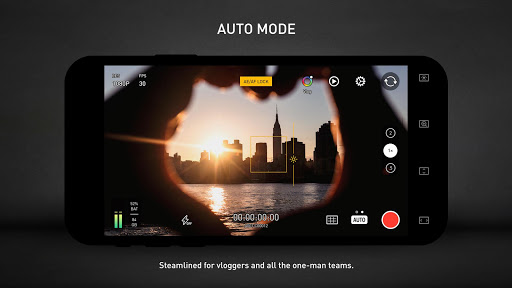
· AUTO Mode: a mode optimized for vloggers and YouTubers, you can use it single-handedly, with our cinematic looks and professional composition assistants.
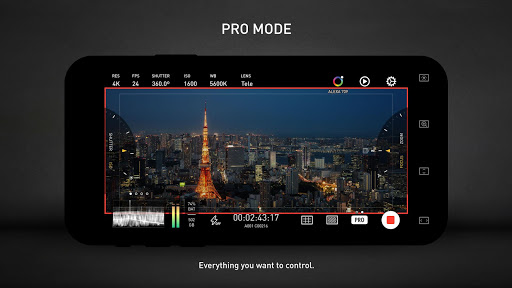
· PRO Mode: a mode designed for professional filmmakers. All the camera information and control settings are well aligned on the screen. The feature you want is always there on the screen.
# COLOR
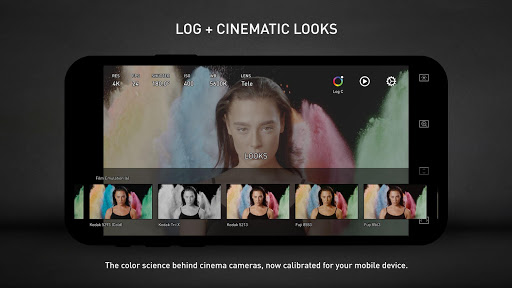
· LOG: it's not only a genuine LOG gamma curve -- we strictly matched your mobile device's color to the industrial standard - ALEXA Log C. Besides the benefit of an outstanding dynamic range, colorists can use all their color solutions for ALEXA cameras with the footage from your phone.
· Cinematic Looks: we provided a dozen of cinematic looks for filmmakers -- the styles are categorized into Neutral Styles, Film Emulation (classic Kodak and Fuji cinema film), Movie Inspired (blockbusters and indie masterpieces), and ALEXA Looks.
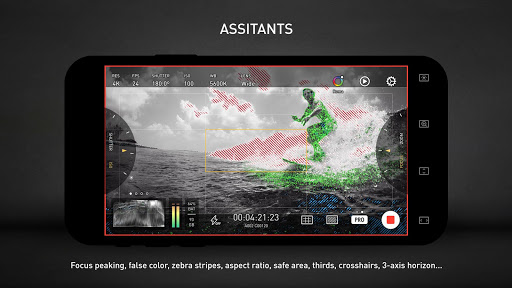
# ASSITANTS
· Frame Drop Notice: Mobile devices are not designed as professional cinema cameras, therefore, you need to know immediately when a frame is dropped.
· Monitoring tools: Waveform, Parade, Histogram, RGB Histogram, Audio Meter.
· Composition assistants: Aspect Ratios, Safe Area, Thirds, Crosshairs, and 3-axis Horizon Indicators.
· Exposure assistants: Zebra Strips,False Color, Exposure Compensation, Auto Exposure.
· Focus assistants: Focus Peaking and Auto Focus.
· Recording: Record Beeper, Record Flash, Volume Key Record.
· Zooming and Focusing: A-B Point.
# DATA
· Frame Rate Normalization: Mobile devices don't have perfect frame rate control, therefore, it's easy to get non-standard variable frame rate. Protake solves this problem fundamentally and makes strictly constant FPS of 24, 25, 30, 60, 120, etc.
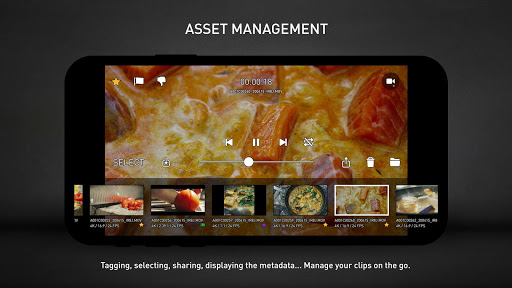
· File-naming: All the video files saved by Protake use the standard naming system: Camera Unit Reel Number Clip Count Suffix. It's something like "A001C00203_200412_IR8J.MOV"... Sounds familiar?
· Metadata: Everything including device model, ISO, shutter angel, white balance, lens, connected accessories, location, are all well recorded in the file's metadata.

What's New with Protake - Mobile Cinema Camera 3.0.8

Multiple bug fixes.

Information

  • Category:
    Photography
  • Latest Version:
    3.0.8
  • Updated:
    2023-03-16
  • File size:
    69.3MB
  • Requirements:
    Android 6.0 or later
  • Developer:
    Beijing Lingguang Zaixian Information Technology
  • ID:
    com.blink.academy.protake
  • Available on:
Reviews
  • avatar
    Amazing but crash alot It is amazing app specially i can do vlog with my bluetooth mic and use the front camera But app is not stable and crsh alot Please fix these issues You have a great app
    2020-10-09 09:46
  • avatar
    I really like the app and how simple it is. I just don't understand when I switch to 60 frames per second I don't get the color log option anymore. Will there be an update to fix that or is there some ways around that? I have the paid version and using a pixel 4 XL thanks.
    2020-10-07 07:36
  • avatar
    Absolutely disappointed! I was recommended by someone that the paid version is even better. I feel it was a complete waste and that I can't recommended it further. The app completely freezes the moment I start recording. It's horrible. I tried reaching out to their email but no response. Cancelled the membership ultimately.
    2020-09-30 05:59
  • avatar
    Well so far the app works great except I can't purchase the Pro version because the app won't let me due to a bug. I see a lot of users having problems with the app not working properly, it seems fine for me except all I can have is the free version because I can't upgrade. Not good, I guess protake doesn't want my money.
    2020-08-03 01:31
  • avatar
    First of all I cannot record 60fps and I cannot select any color profile while using 120fps. All this was in auto. I tried paying for the app so I could use the flat color profile but when I tried paying for it, it redirects me to alipay and I can't understand anything. From reading these comments I think I'll stick to the unpaid version. Was so excited to see this app and it is such a disappointment. Filmic pro doesn't allow color profiles on my phone so I think I'll just use my native camera.
    2020-07-31 08:13
  • avatar
    Misleading and very unstable app! This app was hyped up by Matti Hapooja and I was impressed initially and bought a subscription to be able to use the color profiles option, which was the main attraction for me. But this app is so unstable, I record but then if it's a minute or longer it never saves and I can't stop recording. It just freezes and then I have to force stop it to find out nothing was recorded. not able to get my subscription money back either. Only the developer can issue a refund. UPDATE: Developer of Protake - Mobile Cinema Camera app is not responding at all for my refund request. I am not only one, the app just doesn't work for anyone. It was hyped by a famous personality on YouTube but it doesn't work. Although I have cancelled future renewals, I want to receive a refund for this year's value, even if it is prorated for the used period of few days that I have had this app. This purely a fraudulent app. I would also like it to be removed since so many people have already complained. It will not be possible to get the review video on YT to be removed, but at least the app can be taken down by Google.
    2020-07-19 07:38