

DOWNLOAD IS NOT SUPPORTED IN WEB STORE!
Use the latest version of 9Apps to download APK&OBB file of games in one click!
DOWNLOAD 9APPS

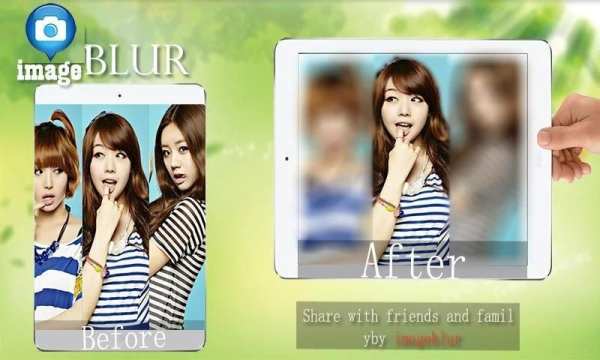




Blur Photo Editor is an image beyond use in unwanted blurring a portion of your image, you can also fast.You, you can select photos from unblur galleries and photos using the camera & blurring the image of you. User also have an option to select the brush size. User can share the image to social media like Face book and Gmail.
Feature:
- Zoom in and Zoom out for image
- Blur intensity adjustment
- Brush Size adjustment
- Share it on your favourite social media platforms like Facebook, Twitter, Instagram, Whatsapp
- Blur, adjust the intensity
How To Use:
1. Select a Photo your want to blur.
2. Blur the photos using touch and watching the blur path on magnifying glass to accurately blur the photo.
3. Using Zoom, Blur Switch to help you Blur Photos.
4. Use advanced Photo editing tools like Undo, Redo, Brush Size and more to accurately blur photos.
5. Save the photo into your sd-card or share it on your favourite social media platforms like Facebook, Twitter, Instagram, Whatsapp,etc.




Facebook Lite
4.02.5MB

Temple Run 2
4.4122.1MB

Dearmet: Video Chat, Live Talk
4.043.4MB

imo beta -video calls and chat
4.394.0MB

ShopClues
3.816.4MB

Mushroom Takeover
4.569.0MB

Candy Crush Saga
4.491.1MB

Quikr: Homes, Jobs, Cars Etc
4.120.8MB

Offline Music Mp3 Player- Muso
4.535.9MB

Talking Tom Cat
3.963.0MB