


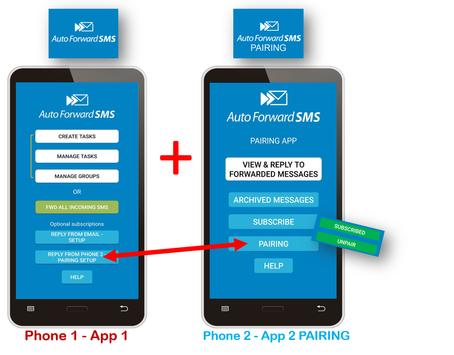

Auto Forward SMS - PAIRING app (App 2).
IMPORTANT: this PAIRING app must PAIR with your other Phone (Phone 1) which has our main App 1 installed. Otherwise it won't work.
It's NOT a spy app & can't 'get' SMS from another person's phone.
PAIRING is different to normal SMS forwarding. In fact, PAIRING is not SMS at all. It is
MIRRORING
Phone 1 & Phone 2 messages via the internet. Instructions follow...
YOU NEED 2 ANDROID PHONES
► Phone 1 is the 'master' mobile phone where App 1 is installed.
► Phone 2 is the remote mobile phone where App 2 PAIRING (on this page) is installed.
► Phone 2 PAIRS with Phone 1 and
mirrors
Phone 1's SMS while PAIRED.
Please FIRST INSTALL App 1 on Phone 1.
To do this, grab your Phone 1 & browse to: https://play.google.com/store/apps/details?id=com.kerryn.autoforwardsms
(App 1 is a paid app)
Follow the easy instructions on
Phone 1
in
REPLY FROM PHONE 2 PAIRING SETUP screen
to send App 2 PAIRING link to Phone 2, then PAIR your 2 phones.
IMPORTANT:
On Phone 1/App 1, switch
FWD ALL INCOMING SMS
ON.
Where it says:
"When SMS arrives, forward to this number:"
you can leave this field blank as when the 2 phones are PAIRED, the messages will MIRROR on Phone 2
(unless you also want to forward a plain SMS separately, which we don't advise.)
.
You need stable internet connection for both mobile Phones,
& both must use the same Google account.
--
How it works:
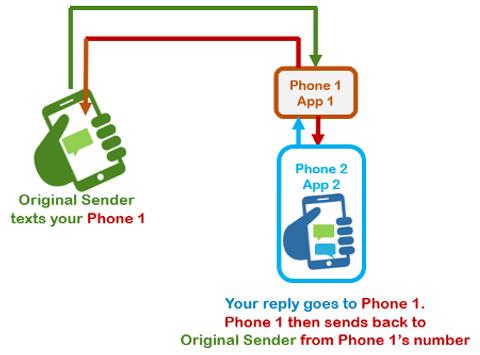
• When PAIRED, when you get SMS on Phone 1, those text messages will also appear on Phone 2 in
VIEW & REPLY TO FORWARDED MESSAGES
screen.
• Then you can REPLY from Phone 2.
• Your REPLY hops back to Phone 1
• Then back to the original sender.
The sender only ever sees Phone 1's number, so it works like a remote reply service.
Example:
If Phone 1 is your work phone and Phone 2 is your personal phone, you can view & respond to SMS sent to your work mobile phone
from your personal mobile phone
whilst PAIRED.
The sender will only see your reply as coming from your WORK phone number.
NOTES:
- Your 2 phones must be PAIRED via internet.
- You can PAIR/UNPAIR anytime.
-
For security, after unPAIRING, the forwarded & archived messages will 'disappear' from phone 2, but will reappear when PAIRED with Phone 1 again.
However, the SMS conversation will be on
Phone 1
as normal. This does not disappear from Phone 1 when phones are unPAIRED because it's a normal SMS conversation on your Phone 1's default Messages app
- SMS from a word sender are non-repliable
- both apps are for Android only.
- MMS/image/attachment forwarding does not work
- When you want to remote replying from Phone 2, simply tap UNPAIR on Phone 2. (rePAIR anytime...ensure you have internet connection and your subscription is current).
- This service is an optional subscription. Price is 79c-99c per month local currency.
-----
Another example scenario:
Assuming your phones are PAIRED.....
1) Carol sends an SMS to your Phone 1 where Auto Forward SMS main app is installed.
2) Because your 2 phones are PAIRED, Carol's message will automatically appear on your Phone 2 (where this PAIRING app is). You can view and reply to Carol from VIEW & REPLY TO FORWARDED MESSAGES screen on Phone 2.
OTHER FEATURES
- You can export conversations to an email address, or save to your phone's files for later sharing. Conversation is time stamped (handy for backups and recordkeeping).
- Has its own VIEW & REPLY TO FORWARDED MESSAGES screen plus an ARCHIVE.
- the app tells you when an SMS arrives from Phone 1.
------
We offer you free VIP support service. Email: support@autoforwardsms.com
.
You can also contact us directly from the apps in HELP.
Thank you. Look forward to doing business with you!
Kerryn & the Auto Forward SMS team.
A few more bug zaps.




9Apps 4.9













