













DOWNLOAD IS NOT SUPPORTED IN WEB STORE!
Use the latest version of 9Apps to download APK&OBB file of games in one click!
DOWNLOAD 9APPS

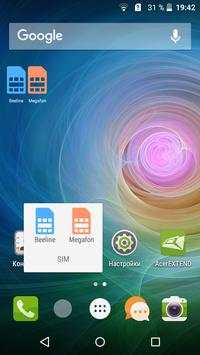
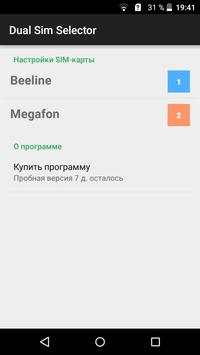
Dual Sim Selector - this is a very simple application (widget) that allow you to easily and conveniently call the desired SIM-card. You no longer need to check the settings of the phone or manually switch the SIM-card.
The functional application is very simple: You need to add a widget, or create an icon for the SIM-card. To make a call, simply clicks on the widget to the desired SIM-card, and will automatically open a DIALER or a list of contacts, and your next call will go to the selected SIM-card.
You can create a widget icon and SIM-cards, which can be marked in the Dock bar and grouped into folders.
To create a widget to get the list of widgets "Two SIM - widget" and insert it on your screen. The widget's settings, select the action (to open a set of numbers or contacts list), select the widget icon.
To create a SIM-card icon in the widget list, locate «Dual Sim Selector» and add an icon on the screen. You can also select an action and SIM-card. For each SIM-card you need to create your iknoku.
** If widget does not appear in the widget list, then make sure that the program is installed in the phone's memory, not on the SD card. Reboot your phone.


