



DOWNLOAD IS NOT SUPPORTED IN WEB STORE!
Use the latest version of 9Apps to download APK&OBB file of games in one click!
DOWNLOAD 9APPS


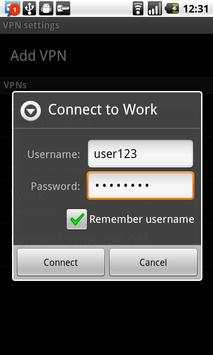
Do you use VPN? With this app you can connect in 5 clicks. If you want 1-click connect, check out our (non-free) 1 VPN app.
This app lets you store your VPN password and provides a short cut to the built-in Android VPN Settings. This will save you time when connecting.
Thanks to all of you that have given us nice and constructive comments. To the trolls that add negative comments without any idea of why and how to use this app, please get a life...
This app is for you if you already have a working VPN configured and want to connect it easier.
If you are looking for a VPN to unblock facebook, or similar, then you should check out the PandaPow app (which costs money to use).
If you have problems connecting to a VPN, you should probably ask the VPN server administrator for help.
For the rest of you, here are instructions how to use this app:
1. Install the 5 VPN widget (long press on home screen)
2. Tap the widget.
3. Fill in the password of your VPN account.
4. Click connect. This will put the password in the clip board and launch the Android built-in VPN Settings (you may need to choose the "Settings" from a list).
5. Click on the VPN you wish to connect. Note: this assumes you have already configured the VPN.
6. Paste the password from the clipboard.
7. Connect.
Next time you click the widget you will go straight to step 5, since you already have a stored password.
If you only want a shortcut and don't want to save a password, simply fill in some dummy password.
If you want to change the stored password, you must open the app, clicking the widget will take you straight to the Android VPN Settings.
Update for Andorid 3.0 and upward.



말하는 고양이 토킹톰
3.963.0MB

Temple Run 2
4.4122.1MB

Offline Music Mp3 Player- Muso
4.535.9MB

Candy Crush Saga
4.491.1MB

imo beta -video calls and chat
4.394.0MB

Dearmet: Video Chat, Live Talk
4.043.4MB

Facebook Lite
4.02.5MB

Quikr – Search Jobs, Mobiles,
4.120.8MB

Mushroom Takeover
4.569.0MB

ShopClues
3.816.4MB