









DOWNLOAD IS NOT SUPPORTED IN WEB STORE!
Use the latest version of 9Apps to download APK&OBB file of games in one click!
DOWNLOAD 9APPS
Do you have problems with controlling the rotation of your screen? The Rotation Control - Flip Screen & Set Orientation settings App, will make the phone rotation easy to control and let you also also prevent other applications from changing screen orientation.
We've all been hit by motion control screen rotations at some point or another. Having the display orientation suddenly go from portrait to landscape when watching a video or reading an interesting article , is one of the biggest irritations that come with using an android phone.
Increase productivity - unnecessary rotation will distract you and interrupt your workflow!
Power saving - every screen rotation will involve a lot of computation. By reducing unnecessary rotation the battery will last a bit longer
You can control screen orientation and also can prevent the other application from changing screen orientation.
The following rotation modes are available in this flip screen app :
-- Guard: this application prevents the other application from changing screen orientation.
-- Auto Rotation: screen orientation is determined by a physical orientation sensor.
-- Portrait: the screen is in a portrait orientation.
-- Portrait (Reverse): the screen is in a portrait orientation; the opposite direction from normal portrait.
-- Portrait (Sensor): the screen is in a portrait orientation, but the sensor is used to change direction.
-- Landscape: the screen is in a landscape orientation.
-- Landscape (Reverse): the screen is in a landscape orientation; the opposite direction from normal landscape.
-- Landscape (Sensor): the screen is in a landscape orientation, but the sensor is used to change direction.
And of course depending on the device, you may not be able to use several modes.
Screen orientation is something that often gets annoying on Android when the auto rotate is activated, But don't you worry there,we've got you covered!
This is a free to use App, the rRotation Control
Flip Screen & Set Orientation settings app, can be used by everybody, the settings are simple to use and understand, it will detect the device's sensor orientation and show a transparent button to let you decide whether the screen should be rotated to landscape or portrait, You also can prevent the other application from changing screen orientation.
This is a one touch operation, to change the automatic rotation.
and also This is an
adaptive rotation:
If you find automatic screen rotation annoying then this app is for you. It will detect the device's orientation and show a transparent button to let you decide whether the screen should be rotated to landscape or portrait
Lock the screen in landscape or portrait - it will lock the screen the way you want even when some apps don't offer certain orientation
If you like our rRotation Control
Flip Screen & Set Orientation settings app, give us some encouragement for more creativity in our next work,enjoy using flip screen, hone rotation, settingsapp, and rotation control to your android phone.
![Control Screen Rotation for Apps Individually - Samsung Galaxy Note 2 [How-To] screenshot 1](https://i.ytimg.com/vi/zcKm2XlW9Nc/mqdefault.jpg)


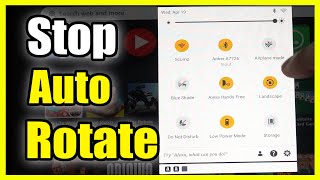

Rotation Control - Flip Screen & Set Orientation New Features


