wifi password ip dns on 9Apps

Free download latest wifi password ip dns for Android here and enjoy it with your phone. Below you can download a list of top and latest apps related to wifi password ip dns . 9APPS is a fast, safe app store. With 9APPS, you can save a lot of time on searching and downloading apps.

#1 WiFi Password, IP, DNS

WiFi Password, IP, DNS
Rating: star 4.0 | Version: 1.3.6 | Size: 2.7MB
WiFi Password, IP, DNS screenshot 1 WiFi Password, IP, DNS screenshot 2 WiFi Password, IP, DNS screenshot 3

ROOT REQUIRED! ROOT REQUIRED to see the password!
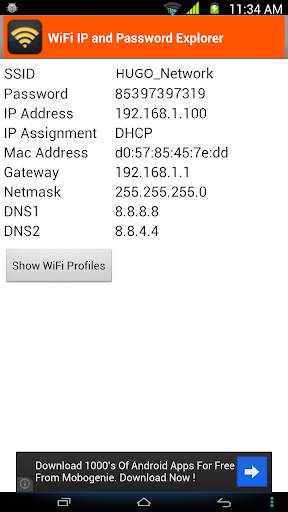
* It shows password of all Wifi networks you have connected Wifi only. This is not a hack tool.
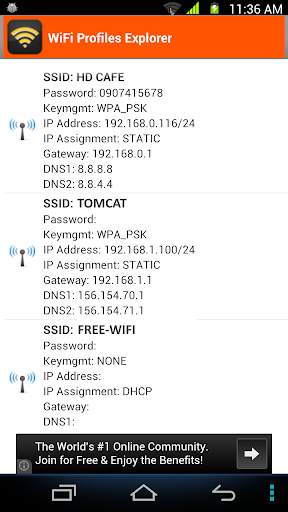
Sometimes your friends want to use your home Wi-fi connection but you can have a problem if you forget your own password. This app will help you out in this situation. It can also display the passwords of all Wi-fi profiles on your device.
MAIN FEATURES:
1. Remember/Display Wi-fi SSID and DHCP Info (IP address, gateway, DNS) of all Wi-Fi networks you will connect to. This is very helpful when your device cannot obtain IP address via DHCP and you have to configure Wi-fi using static IP. Based on this info, you can use
Wifi settings
to configure the Wi-fi network for your device.
2. Display the connected Wi-fi's password.
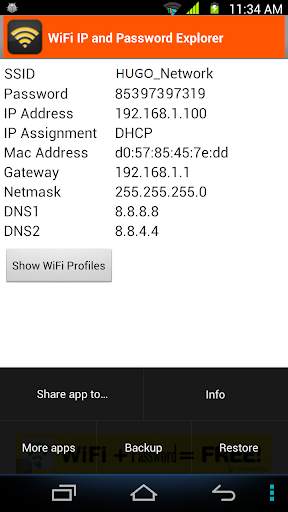
3. List out all Wi-fi profiles on your devices. You can select one or all Wi-fi profiles and share it to everyone via email, SMS, .... You can also copy them to file that is located at /storage/emulated/0/htmt/wifipassword
4. Backup all Wifi profiles to /storage/emulated/0/htmt/wifipassword/wifiprofile.lnz
5. Restore all Wifi profiles from /storage/emulated/0/htmt/wifipassword/wifiprofile.lnz. You can use this wifiprofile.lnz to restore to other device.
NOTES:
* If you have already installed my app and realized that your device has not been rooted yet, please don't rate 1*. There is the only one way I can retrieve the Wi-fi password info that is I need to have root permission. Thank you for your installation.

...

👉 For More Detail of WiFi Password, IP, DNS

#2 WiFi Settings (dns,ip,gateway)

WiFi Settings (dns,ip,gateway)
Rating: star 4.3 | Version: 1.3.4 | Size: 2.7MB
WiFi Settings (dns,ip,gateway) screenshot 1 WiFi Settings (dns,ip,gateway) screenshot 2 WiFi Settings (dns,ip,gateway) screenshot 3

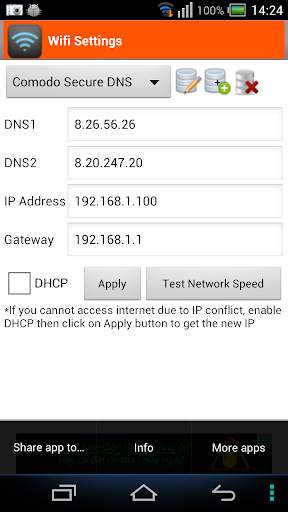
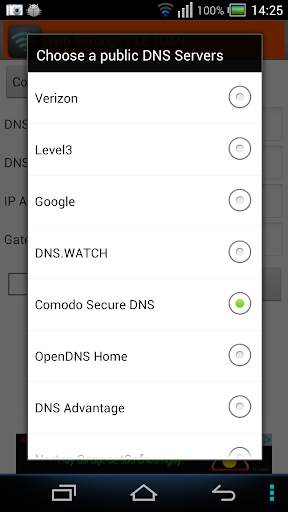
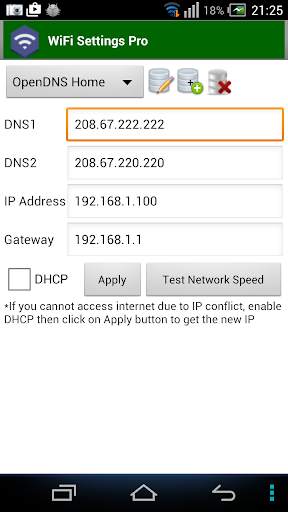
This app enables you to access the blocked sites by using some free DNS servers. If your device is unable to obtain IP address, let use this app. This app works perfectly on Android 2.3 and up. It supports for Android 5.x Lollipop too. On android 6.x, please use
https://play.google.com/store/apps/details?id=htmt.rootdnssettings
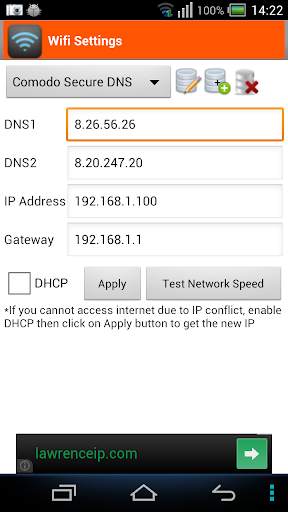
When you have changed the DNS successfully, you can check the network speed by clicking on "Test Network Speed" button. It help you find out the best DNS server for your network.
* Why using free DNS servers?
- Speed up internet browsing
- Be able to access to blocked websites
* Main features:
- Change IP address
- Change Gateway
- Change DNS
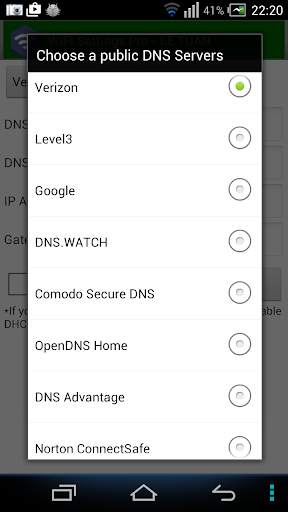
- Add/Update/Remove DNS: You can add a new DNS server to the DNS List. You can also update/remove the DNS that you added to the list.
- Test Network speed
* FAQ 1. How to change the DNS and use the static IP
Step 1: Turn on Wifi then launch this app.
Step 2: Choose any DNS then click on Apply button. That's all.
* FAQ 2. How to change back to the original DNS
In case you don't want to use custom DNS anymore, please check on "DHCP" then click on Apply button.
* FAQ 3. You are connected to the network but cannot access the internet, what's wrong?
Your IP device may conflict with another device in your network. In order to get a new IP, check on the "DHCP" then click on Apply button. After restarting the Wifi connection successfully, you will get the new IP address. At that time, you can change the DNS manually as shown in FAQ1.
* Notes:
- This app does NOT require root permission.
- This app only works on IPv4 Wifi networks.
- The DNS changes takes effect permanently even after reboot
- Each SSID gets it's own setting, so you can default to your home or work router's setting (which you've already set the way you want). Just remember to set it the first time you use a new access point.

...

👉 For More Detail of WiFi Settings (dns,ip,gateway)

#3 Wifi password IP, DNS (Scanner, Manager)

Wifi password IP, DNS (Scanner, Manager)
Rating: star 3.0 | Version: 1.3.6 | Size: 2.7MB
Wifi password IP, DNS (Scanner, Manager) screenshot 1 Wifi password IP, DNS (Scanner, Manager) screenshot 2 Wifi password IP, DNS (Scanner, Manager) screenshot 3

This application shows password of all Wifi networks you have connected Wifi only. This is not a hack tool.
Sometimes your friends want to use your home Wi-fi connection but you can have a problem if you forget your own password. This app will help you out in this situation. It can also display the passwords of all Wi-fi profiles on your device.
MAIN FEATURES:
1. Remember/Display Wi-fi SSID and DHCP Info (IP address, gateway, DNS) of all Wi-Fi networks you will connect to. This is very helpful when your device cannot obtain IP address via DHCP and you have to configure Wi-fi using static IP. Based on this info, you can use Wifi settings to configure the Wi-fi network for your device.
2. Display the connected Wi-fi's password.
3. List out all Wi-fi profiles on your devices. You can select one or all Wi-fi profiles and share it to everyone via email, SMS, .... You can also copy them to file that is located at /storage/emulated/0/htmt/wifipassword
4. Backup all Wifi profiles to /storage/emulated/0/htmt/wifipassword/wifiprofile.lnz
5. Restore all Wifi profiles from /storage/emulated/0/htmt/wifipassword/wifiprofile.lnz. You can use this wifiprofile.lnz to restore to other device.
NOTES:
* If you have already installed my app and realized that your device has not been rooted yet, please don't rate 1*. There is the only one way I can retrieve the Wi-fi password info that is I need to have root permission. Thank you for your installation.
IMPORTANT
This app is not for hacking or cracking any kind of Wifi Password any kind of misuse of this app, developers will not be responsible.

...

👉 For More Detail of Wifi password IP, DNS (Scanner, Manager)

#4 WiFi Info-IP,DNS

WiFi Info-IP,DNS
Rating: star 3.0 | Version: 1 | Size: 1.3MB
WiFi Info-IP,DNS screenshot 1 WiFi Info-IP,DNS screenshot 2 WiFi Info-IP,DNS screenshot 3

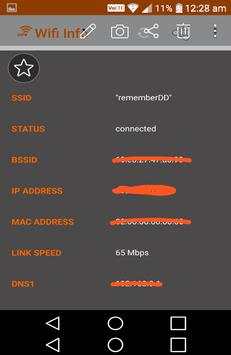
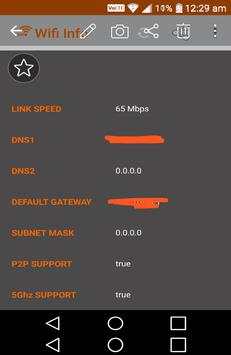
Wifi,IP,DNS information view app.
connected wifi info ip,dns view app.
-wifi info view
IP
DNS
SSID
BSSID
ip adress,ip config view in this wifi information app

...

👉 For More Detail of WiFi Info-IP,DNS

#5 WiFi Settings (DNS,IP,..) PRO

WiFi Settings (DNS,IP,..) PRO
Rating: star 4.1 | Version: 1.2.7 | Size:
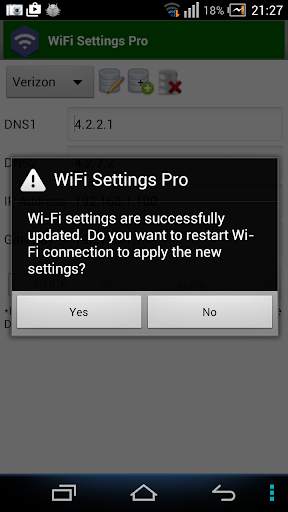
WiFi Settings (DNS,IP,..) PRO screenshot 1 WiFi Settings (DNS,IP,..) PRO screenshot 2 WiFi Settings (DNS,IP,..) PRO screenshot 3

แอพนี้ช่วยให้คุณสามารถเข้าถึงไซต์ที่ถูกบล็อกโดยใช้เซิร์ฟเวอร์ DNS ฟรี หากอุปกรณ์ของคุณไม่สามารถรับที่อยู่ IP ให้ใช้แอพนี้ได้ แอพนี้ทำงานได้อย่างสมบูรณ์แบบบน Android 2.3 ขึ้นไป รองรับ Android 5.x Lollipop ด้วย บน Android 6.x โปรดใช้
https://play.google.com/store/apps/ รายละเอียด? id = htmt.rootdnssettings
มี ไม่มีโฆษณาแบนเนอร์
ในรุ่น WiFi Settings (DNS, IP) Pro
เมื่อคุณเปลี่ยน DNS เรียบร้อยแล้วคุณสามารถตรวจสอบความเร็วเครือข่ายได้โดยคลิกที่ปุ่ม "ทดสอบความเร็วเครือข่าย" มันช่วยให้คุณค้นหาเซิร์ฟเวอร์ DNS ที่ดีที่สุดสำหรับเครือข่ายของคุณ
คุณควรลองใช้มาตรฐาน
การตั้งค่า WiFi
และตรวจสอบว่าใช้งานได้กับอุปกรณ์ของคุณก่อนอื่น!
* ทำไมต้องใช้เซิร์ฟเวอร์ DNS ฟรี? - เร่งความเร็วอินเทอร์เน็ต
- สามารถเข้าถึงได้ ในการบล็อกเว็บไซต์
* คุณสมบัติหลัก:
เปลี่ยนที่อยู่ IP
- เปลี่ยนเกตเวย์
- เปลี่ยน DNS
- เพิ่ม / อัปเดต / ลบ DNS: คุณสามารถเพิ่มเซิร์ฟเวอร์ DNS ใหม่ ไปยังรายการ DNS นอกจากนี้คุณยังสามารถอัปเดต / ลบ DNS ที่คุณเพิ่มลงในรายการ
- อนุญาตให้ผู้ใช้ทดสอบความเร็วเครือข่าย
คำถามที่พบบ่อย 1. วิธีการเปลี่ยน DNS และใช้ IP แบบคงที่ 1: เปิด WiFi แล้วเปิดแอปนี้
ขั้นตอนที่ 2: เลือก DNS ใด ๆ จากนั้นคลิกที่ปุ่มใช้ นั่นคือทั้งหมดที่
* คำถามที่พบบ่อย 2. วิธีการเปลี่ยนกลับเป็น DNS ดั้งเดิม
ในกรณีที่คุณไม่ต้องการใช้ DNS แบบกำหนดเองอีกต่อไปโปรดตรวจสอบ "DHCP" จากนั้นคลิกที่ปุ่มใช้
* คำถามที่พบบ่อย 3. คุณเชื่อมต่อกับเครือข่าย แต่ไม่สามารถเข้าถึงอินเทอร์เน็ตมีอะไรผิดปกติ? อุปกรณ์ IP ของคุณอาจขัดแย้งกับอุปกรณ์อื่นในเครือข่ายของคุณ ในการรับ IP ใหม่ให้ตรวจสอบ "DHCP" จากนั้นคลิกที่ปุ่มใช้ หลังจากรีสตาร์ทการเชื่อมต่อ WiFi เรียบร้อยแล้วคุณจะได้รับที่อยู่ IP ใหม่ ในเวลานั้นคุณสามารถเปลี่ยน DNS ด้วยตนเองตามที่แสดงใน FAQ1
* หมายเหตุ:
แอพนี้ไม่ต้องการการอนุญาตรูท
- แอพนี้ใช้งานได้กับเครือข่าย WiFi IPv4 เท่านั้น
- การเปลี่ยนแปลง DNS จะมีผล อย่างถาวรแม้หลังจากการรีบูต
- แต่ละ SSID ได้รับการตั้งค่าของตัวเองดังนั้นคุณสามารถเริ่มต้นการตั้งค่าบ้านหรือเราเตอร์ของคุณได้ (ซึ่งคุณได้กำหนดวิธีที่คุณต้องการแล้ว) เพียงจำไว้ว่าให้ตั้งค่าเป็นครั้งแรกที่คุณใช้จุดเชื่อมต่อใหม่

...

👉 For More Detail of WiFi Settings (DNS,IP,..) PRO

Search Results

1/1

You may like

DOWNLOAD IS NOT SUPPORTED IN WEB STORE!
Use the latest version of 9Apps to download APK&OBB file of games in one click!
DOWNLOAD 9APPS