




DOWNLOAD IS NOT SUPPORTED IN WEB STORE!
Use the latest version of 9Apps to download APK&OBB file of games in one click!
DOWNLOAD 9APPS
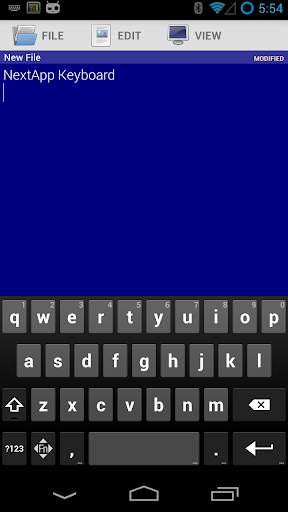
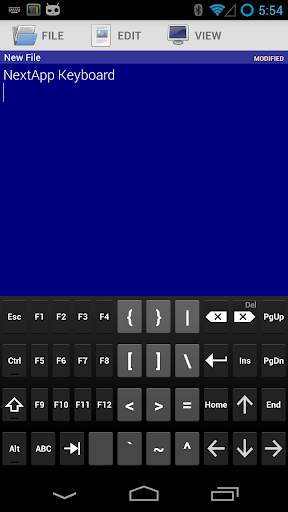
The NextApp Technical Keyboard is a derivative of the AOSP keyboard, with added arrow keys and other special keys, and a slightly tweaked QWERTY layout that is closer to that of a PC Keyboard. There are multiple themes to choose from.
A "precision feedback" feature increases feedback vibration when your presses are not near the center of the keys. When autocorrection is applied, a double-pulse feedback is rendered.
This is a BETA RELEASE of this app. If you experience issues with it, please report them to android@nextapp.com. It's extremely difficult to have a conversation using the Play Store review system.
This version comes with English, French, German, Italian, Portuguese (Brazilian), Russian, and Spanish dictionaries.
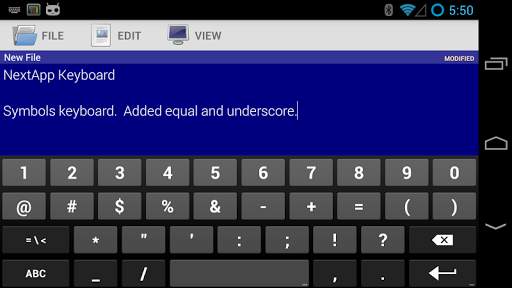
I would greatly appreciate feedback on the keyboard layouts, including the arrangement of special keys on the alphabet keyboard, symbols keyboard, and function keyboards.
Function Keyboard
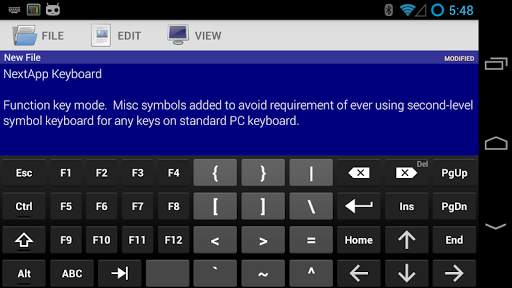
This keyboard includes a function key ("Fn") toward its lower left corner which can be used to access many additional keys typically found on a PC or Mac keyboard, including:
• Cursor Arrow Keys
• Page Up / Page Down
• Insert, Delete, Home, and End.
• Function F1-F12.
• Ctrl and Alt
• Tab
• Escape
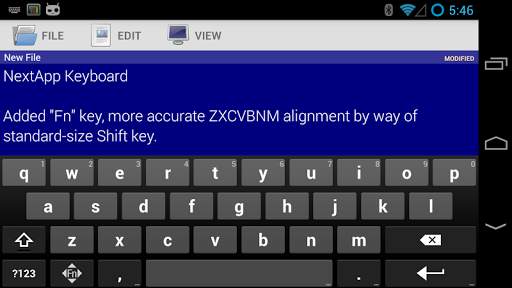
The fundamental QWERTY keyboard layout has been very slightly tweaked to more closely replicate that of a PC keyboard. Specifically, the size of the left shift key has been reduced such that the third row (ZXCVBNM) is no longer overly shifted to the right. The shift key is now a standard sized key. This modification only applies to phones (the AOSP keyboard already uses this layout for tablets).
Permissions
This keyboard is based on the AOSP keyboard from Android KitKat 4.4. It uses identical permissions to that keyboard. The "read contacts" permission is used to autocomplete names from your contacts. This keyboard DOES NOT send any data to anyone.
Thank you for helping beta test this keyboard!


All features are now free, including themes and precision vibration feedback. No beta expiration.
Long pressing space now sends tab character (may be disabled via settings).
Option to always use "PC Layout" in landscape orientation.