











DOWNLOAD IS NOT SUPPORTED IN WEB STORE!
Use the latest version of 9Apps to download APK&OBB file of games in one click!
DOWNLOAD 9APPS


Xvid downloader and browser is single tab lighting fast browser.
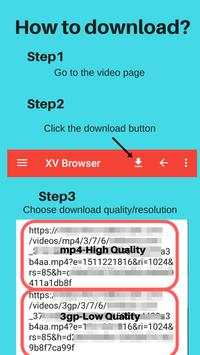
How to Download?
1.Go to the website
2.Go to the video page
3. Click the download button
4. Choose the download quality/resolution.
5.Video will be downloaded to XV Browser folder
Features:
Video Grabber
Video grabber automatically grabs videos available on the page on clicking the download button.
No History
Always Incognito mode, no history of visited sites, exit the app and everything is gone.No need to manually delete history.
Lighting Fast
Browse with no lag, enjoy lighting fast loading and browsing.
No Intrusive Ads
Only a banner ad at bottom,
No Interstitial, no video ads.
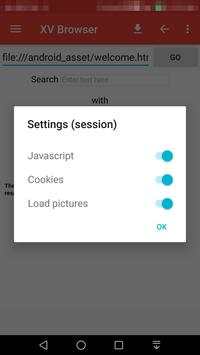
Enable/Disable Java/Images/Cookies
Enable and disable the browsing properties you want.
Multiple Search Engines
Enjoy searching on 5search engines, choose default search engine.
The Search engines are properties of their respective organizations.
Please feel free to provide suggestions, feedback and complaints.
Please note: Download speed is dependent on your internet speed and the website you are downloading from.
Please make sure you have the permission to access and download the content you want to download.


