





DOWNLOAD IS NOT SUPPORTED IN WEB STORE!
Use the latest version of 9Apps to download APK&OBB file of games in one click!
DOWNLOAD 9APPS

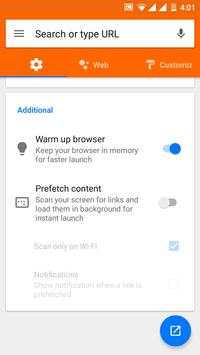
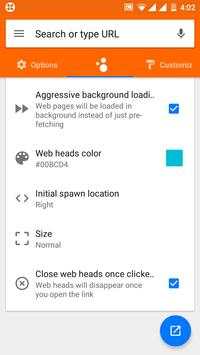

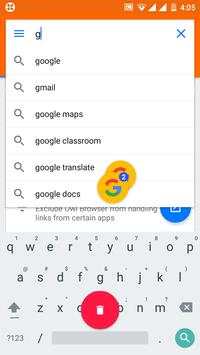
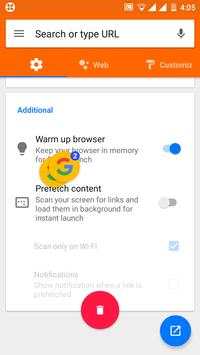
Owl Browser is a browser based on Google Chrome's Chrome Custom Tab.
It simplifies browsing by prioritizing rendering a link first than anything else. This is achieved by use of Chrome Custom Tab which are light weight browser tabs from Google chrom.
Owl Browser slides over the website from the app, enabling you to transition into the website seamlessly. Even if you navigate multiple times, you can always press X to quickly return to the app.
What do I need to use this?
You need any custom tab compatible browsers. As of now only Google Chrome 45 and greater supports custom tab, hence you need to have it installed to make any use of this app. You can install it here : https://play.google.com/store/apps/details?id=com.android.chrome
Web heads
• Web heads help you save time by loading a page in background (5.0 only, for other versions pre-fetch is used which only aims to reduce loading time) while enabling you to continue using the app of your choice. Floating bubbles are provided that enables you to manage multiple links.
Compared to normal chrome?
With Owl Browser, you are essentially loading a light weight version of chrome that is fast and designed for the sole purpose of displaying webpages quickly. You can always Menu - Open in chrome to open the page in chrome and enjoy all features like bookmarks, history and multi-tab browsing!
Is it secure?
Owl Browser uses Chrome's latest rendering engine which is always updated through Google play. Hence you are always latest on updates hence browsing using Owl Browser is much more secure than normal Webview found on android versions below 5.0.



Quikr – Search Jobs, Mobiles,
4.120.8MB

imo beta -video calls and chat
4.394.0MB

Facebook Lite
4.02.5MB

Mushroom Takeover
4.569.0MB

Temple Run 2
4.4122.1MB

Candy Crush Saga
4.491.1MB

Dearmet: Video Chat, Live Talk
4.043.4MB

ShopClues
3.816.4MB

말하는 고양이 토킹톰
3.963.0MB

Offline Music Mp3 Player- Muso
4.535.9MB