






DOWNLOAD IS NOT SUPPORTED IN WEB STORE!
Use the latest version of 9Apps to download APK&OBB file of games in one click!
DOWNLOAD 9APPS

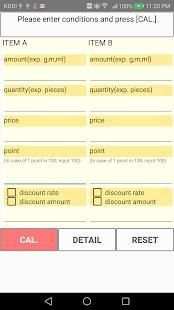
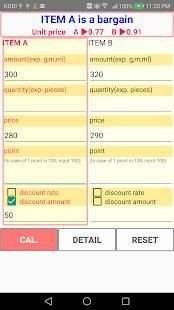
I would recommend it to you who wish to shop even a little! !
For example, this application can be used.
· Bought a bottle of store A, such as coffee, seasoning, shampoo, refilling at B store Which is it better to buy?
· Toilet paper, 12 pieces of regular price, 6 pieces of time sale, which price is more advantageous?
· Which deals with the same fixed price sweets, A store of all discounts and B shop of point five times day, which one is better?
1. Enter the prices for items A and B.
2. Enter other items. (Items you want to compare as necessary)
Capacity (eg 300 g, 40 cm, 500 ml etc.)
· Quantity (example: 10 pieces, 5 sets etc.)
· Point unit price (For example, if you enter 10, 1 point reduction by 10 dollars)
· Discount (eg 30% OFF, 10 dollar discount etc.)
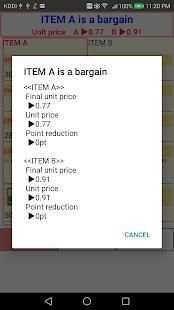
3. When you press the "Calculate" button, the amount per unit will be displayed and you will know immediately which one is better.
* Detailed calculation result can be confirmed by pressing "Details" button
* Pressing the "Reset" button clears the input condition and calculation result
· Please use the calculation results of this application as a reference.
· It is not possible to compensate for the profit / loss that occurred at the time of use.
Saya akan merekomendasikan hal ini kepada Anda yang ingin berbelanja bahkan sedikit! !
Sebagai contoh, aplikasi ini dapat digunakan.
· Membeli sebotol toko A, seperti kopi, bumbu, shampoo, mengisi di toko B Yang lebih baik untuk membeli?
· Kertas toilet, 12 buah harga biasa, 6 buah waktu penjualan, yang harga lebih menguntungkan?
· Yang berhubungan dengan permen harga yang sama tetap, Sebuah toko dari semua toko diskon dan B dari koma lima kali sehari, mana yang lebih baik?
1. Masukkan harga untuk item A dan B.
2. Masukkan item lainnya. (Item Anda ingin membandingkan yang diperlukan)
Kapasitas (misalnya 300 g, 40 cm, 500 ml dll)
· Jumlah (contoh: 10 buah, 5 set dll)
· Titik harga satuan (Misalnya, jika Anda memasukkan 10, 1 pengurangan poin sebesar 10 dolar)
· Diskon (misalnya 30% OFF, 10 dollar diskon dll)
3. Ketika Anda menekan tombol "Hitung", jumlah per unit akan ditampilkan dan Anda akan segera mengetahui mana yang lebih baik.
* Hasil perhitungan lengkap dapat dikonfirmasi dengan menekan tombol "Details"
* Menekan "Reset" tombol membersihkan kondisi masukan dan hasil perhitungan
· Gunakan hasil perhitungan aplikasi ini sebagai referensi.
· Hal ini tidak mungkin untuk mengimbangi laba / rugi yang terjadi pada saat digunakan.


![How To Create A Project Costing Application with Budget vs. Actual Costs In Excel [Free Download] screenshot 4](https://i.ytimg.com/vi/2H59thd0W2k/mqdefault.jpg)

Advertisement function added


