





DOWNLOAD IS NOT SUPPORTED IN WEB STORE!
Use the latest version of 9Apps to download APK&OBB file of games in one click!
DOWNLOAD 9APPS
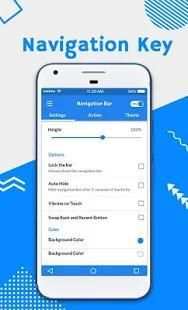
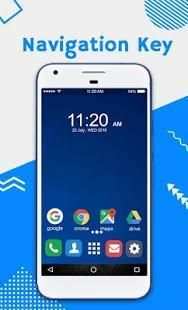
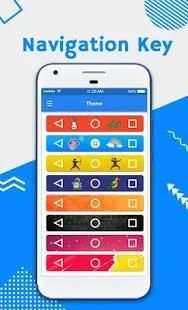
Sometime people bored with there system navigation bar which is only available in single color theme and icon.
Physical device buttons are broken? Soft Navigation Bar will help you by replacing those buttons. It will act same as your physical .
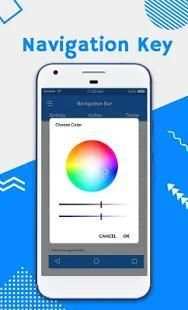
Custom Navigation Bar - Navbar Customize application can replace a failed and broken button for those people who has trouble using buttons or navigation bar panel is not working properly. This app provides several features and colors to make awesome navigation bar.It is easy to swipe up and down navigation bar as assistive touch.
Sometime people bored with there system navigation bar which is only available in single color theme and icon.
Here we introduce new Navigation bar which is for those people who has large screen tab or device and also when device navigation bar panel is not working properly.
The app consists of Trigger Spot and Pie Controls that shows up when Trigger Spot is pressed. Both of them are able to fade off automatically when you do not need it. It can be easily placed anywhere along the edges of the screen by drag and drop. The location of Trigger Spot can be set for landscape and portrait orientations respectively.
How to use ?
- open app, enable permissions if asked
- set location, size ...
- click "Settings-Accessibility" button
- find "Soft Keys - Home Back Button" and enable it
Key Features:
- Auto hide navigation bar
- Easy to swipe up/down to show/hide navigation bar
- Functions: Home, Back, Recent
- Ability to change navigation bar with background and button color
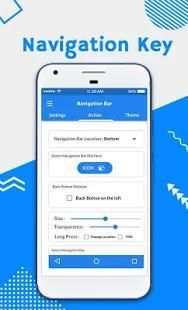
- Ability to set navigation bar size with height
- Ability to Set vibrate on touch
- Options to lock navigation bar
- 15 Themes Available
- Long press action for back, home, recent buttons
Navigation control bar is a nice little navigation bar which you can place anywhere on screen for easy access. It also enables you to customize your navigation bar customize by selecting and applying different themes on navigation bar customizer.
Navigation Control bar is designed to be as simple as possible. Navigation control bar offers the back button, home button and recent button along with an added button to move the navigation bar soft keys to the area of screen where you want it as custom navigation bar - navbar customize. In this navigation bar customize no root all functionality is custom set.
##### Important Note ######
This App needs BIND_ACCESSIBILITY_SERVICE . It uses Accessibility Service to perform Back, Home, Recent Apps Event. This app does not store your passwords, credit card numbers or other personal Information.
Note:- In order for this app to work you should tap On Accessibility Services for this app.
1:- Go to Accessibility Services and tap on Navigation Bar.
2:- Give Accessibility Permissions to Navigation Bar.
Download and give us a review of Custom Navigation Bar Customize.
Kadang-kadang orang bosan dengan ada bar navigasi sistem yang hanya tersedia dalam warna tema tunggal dan ikon.
tombol perangkat fisik broken? Lembut Navigation Bar akan membantu Anda dengan mengganti tombol-tombol tersebut. Ini akan bertindak sama seperti fisik Anda.
Kustom Navigation Bar - aplikasi Navbar Customize dapat menggantikan tombol gagal dan rusak untuk orang-orang yang memiliki kesulitan menggunakan tombol atau panel navigasi tidak bekerja dengan benar. Aplikasi ini menyediakan beberapa fitur dan warna untuk membuat navigasi mengagumkan bar.It mudah untuk geser ke atas dan ke bawah bar navigasi sebagai sentuhan bantu.
Kadang-kadang orang bosan dengan ada bar navigasi sistem yang hanya tersedia dalam warna tema tunggal dan ikon.
Di sini kami memperkenalkan bar navigasi baru yang untuk orang-orang yang memiliki tab layar besar atau perangkat dan juga ketika perangkat navigasi bar panel tidak bekerja dengan benar.
Aplikasi ini terdiri dari Pemicu Spot dan Pie Kontrol yang muncul ketika Pemicu Spot ditekan. Keduanya mampu memudar secara otomatis ketika Anda tidak membutuhkannya. Hal ini dapat dengan mudah ditempatkan di mana saja di sepanjang tepi layar dengan drag dan drop. Lokasi Pemicu Spot dapat diatur untuk landscape dan portrait orientasi masing-masing.
Bagaimana cara menggunakan ?
- aplikasi terbuka, mengaktifkan izin jika diminta
- set lokasi, ukuran ...
- klik "Settings-Aksesibilitas" tombol
- menemukan "Soft Keys - Beranda Button" dan mengaktifkannya
Fitur Utama:
- bar Auto hide navigasi
- Mudah untuk geser ke atas / bawah untuk menampilkan / menyembunyikan navigasi bar
- Fungsi: Home, Back, Terbaru
- Kemampuan untuk mengubah navigasi bar dengan latar belakang dan warna tombol
- Kemampuan untuk mengatur ukuran bar navigasi dengan tinggi
- Kemampuan untuk mengatur bergetar pada sentuhan
- Pilihan untuk mengunci bar navigasi
- 15 Themes Tersedia
- Tindakan Tekan lama untuk back, home, tombol baru-baru ini
Navigasi kontrol bar adalah bar navigasi kecil yang menyenangkan yang dapat Anda tempatkan di mana saja pada layar untuk memudahkan akses. Hal ini juga memungkinkan Anda untuk menyesuaikan bar navigasi Anda menyesuaikan dengan memilih dan menerapkan tema yang berbeda pada navigasi bar penyesuai.
Navigasi Kontrol bar dirancang untuk menjadi sesederhana mungkin. Navigasi kontrol bar menawarkan tombol kembali, tombol home dan tombol baru-baru ini bersama dengan tombol tambahan untuk memindahkan tombol lembut navigasi ke area layar di mana Anda ingin sebagai bar navigasi kustom - navbar menyesuaikan. Di bar navigasi ini menyesuaikan tidak berakar semua fungsi custom set.
##### Catatan penting ######
App ini perlu BIND_ACCESSIBILITY_SERVICE. Menggunakan Layanan Aksesibilitas untuk melakukan Back, Home, Recent Apps acara. Aplikasi ini tidak menyimpan password Anda, nomor kartu kredit atau informasi pribadi lainnya.
Catatan: - Agar aplikasi ini bekerja Anda harus menekan Pada Layanan aksesibilitas bagi aplikasi ini.
1: - Pergi ke Layanan Aksesibilitas dan tekan pada Navigation Bar.
2: - Berikan Izin Aksesibilitas ke Navigation Bar.
Download dan memberi kita review Custom Navigation Bar Customize.


